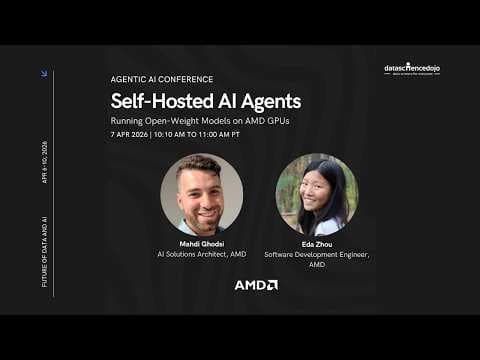
Інструкція: Запуск AI-агентів з відкритим кодом на AMD GPU
Data Science Dojo представила інструкцію із запуску AI-агентів з відкритим кодом на AMD GPU, наголошуючи на економії коштів і контролі завдяки використанню моделей з відкритим кодом і агентських фреймворків, таких як OpenClaw. У підручнику розглядаються основи AI-агентів, їх еволюція від LLM і практичні кроки для розгортання.
Ключові тези
- AI-агентів можна створити з нуля, використовуючи моделі з відкритим кодом на AMD GPU, що зменшує витрати на API.
- Агентські фреймворки, такі як OpenClaw, дозволяють створювати адаптовані та приватні AI-інструменти для виробничих процесів.
- AMD пропонує програму для розробників з безкоштовними GPU-кредитами для запуску навчальних посібників з AI-агентів.
Зниження витрат на API до 50-70% при великих обсягах обробки даних • Повний контроль над даними та моделями — критично для фінансових установ • Можливість кастомізації агентів під специфічні потреби виробництва
OpenClaw, хоч і безкоштовний, вимагає значних зусиль для налаштування та підтримки. Для більшості компаній інтеграція з існуючими системами може бути складнішою, ніж використання API.
Опис відео▼
All right, welcome back everybody. Um, so our next item for today is uh we're looking at AI agent on AMD GPUs. Um, so this this tutorial basically teaches you how to create, you know, a personal AI agent from scratch um without the need for those sort of third-party dependencies um or those sort of like ongoing API fees. So you'll learn how to put together um a tool using agent that is private, it's adaptable, you know, designed for actual workflows uh using openw weight models hosted on AMD GPUs and agentic frameworks like open claw. So um hopefully this can help you save API cost for one, you know, keep complete control of your stack and and host and run um openweight LLMs on AMD GPUs. Um and you also create you know a tool using AI agent that is you know actually prepared for production workflows um utilizing modern agentic frameworks. Um so Ed Sha and um Maddie Godsy will lead this tutorial and I'll hand it over to them to start the tutorial. >> Hello everybody. Uh my name is Maddie. Uh I'm an AI solution architect at AMD. I'm with a here. Um, >> we'll just share a microphone. >> All right. Um, so what we have for you guys today is a quick presentation on um kind of a background of what is an AI agent. We still um I feel there's you know a bit of a gap understanding the difference between LLM to NIA agent and that's kind of evident when we have candidates for jobs and I interviewed him and one of the questions I asked is can you distinguish between the two and um for that reason I think it's good to give a bit of a background um we'll walk through uh you know how it kind of started and how it's evolved and then we're going to end the session with Eda going through a tutorial that we have prepared for you guys. So, you can actually uh in this um session, we're going to actually introduce you guys to AMD developer program where you can actually get free uh AMD GPU credits. So, you'll be able to actually run this tutorial later on your own um with those uh GPU credits. Uh so, we'll get to that. Watch out for the QR codes that we're going to show for uh how to sign up, but for now, we're just going to get to the presentation. We also have the QR code for LinkedIn for uh me and a uh feel free to connect and if you have any questions you can message us but without any uh more delays let's get to the presentation. So in terms of the foundations the first question um would be what is an LLM? And I'm not going to bore you guys with going too much in detail so make it quick. Um, so basically LLM is a large language model and as its core it's a text prediction engine. So you give it a prompt and it predicts what the next most likely tokens are. That's the whole mechanism. It's trained on massive amount of text. So it's incredibly good at uh at this. But the thing is to understand why um this is different than a agent, you need to kind of think of it like a this is the smart book. It's a very smart book that you can ask good questions and it'll know the answer. But um that is kind of to the extent that it goes. Um so if you look at the right column here, what it cannot do, it can't act um on external system. It can't maintain memory for conversations. Uh it can't run a multi-step process on its own and it can't check whether it's own output is correct. So this gap between what an LLM can do and what we actually want is exactly what this whole workshop is about. Uh everything we covered today it's essentially about closing that gap. So let's look at how uh we close the gap between uh going from LLM to an AI agent. The first step is going from L LM to a chatbot. It's actually pretty uh you know natural how that happened. So we first started LLM you can prompt it to get some response but then we had the need for actually having some sort of memory to remember what we asked it before. So that's when the chatbots were evolved and then they got better and better. We even had systems like rag where you can actually give it documents and it will refer to that and respond to you. Now from chatbot to agents that's where things get a bit interesting. You're adding three things here. Not only you add in memory, you add in planning and the ability to take real actions in the world. The agent can run code, call APIs, read and write file files, and it can message uh you know based on the needs you have. It critically um runs in a loop until the task is done. And we're going to get to the loop uh in the next slide and what that's one of the most important concept of AI agents. Okay, so the loop that we were just talking about is known as a react loop. How so how does an agent actually think and act? The dominant pattern is called react which is short for reasoning and acting uh and it observes that whether the job is done or not. It came out of a paper about 2022 and it essentially became the standard approach. The loop has three steps. First the model reasons about what to do next. what's the current situation and what's the goal and what should I do now? Then it acts picking a tool to call. Maybe it runs some code or make an API request. Then it observes. It reads the results of what action um it did and then uh observes to make sure that's done. To make this concrete, say you ask agent to fix a failing test. It reads the test output, sees the error message, reasons about what's wrong, edits the file, runs the test again, sees they pass, and stops. That's three full loops of thought, action, observation with no human involved at any point. So why the loop changes everything here is um a good question to ask and I think um this is one of the core concepts that we need to grasp really um deeply to have a great agent and I think working with different agenting frameworks that I've done in the past u couple years and agent products uh one of the reasons I believe some products like clause code is very strong is they have a really good loop design that actually figures about um how to solve a problem that you throw at it. So without a without a loop, you're basically asking the model to solve a problem in one shot and just hoping to get it right. Uh you have no idea if the fix actually works um or it's complete. So with a loop, the model can run the code, check the output and verify its own work. That verification uh is the part part that it decides whether it needs to stop or go back to the beginning of the loop. Uh so when people like you know obsess over which model is the best sometimes the smaller model actually do a good job in this loop compared to bigger model at one shot. So you know having a great uh agent loop is very important in your whole agent structure. So this is the part that I you know I kind of made this made this in my own language of what are the recipes of actually making an AI agent. What are the main core components you need? And I kind of like this slide because I've myself experimented with this um to see if you can actually build a self-expanding or self-arning agent with the minimal code and kind of let it evolve as you need. And this is totally possible and that's one of the things that OpenCloud did really great and that's one of the reasons it's very popular is like they made a really good software that can act as your agent for general purposes. So the three uh components that you need uh to be able to build an AI agent are the model, the runtime software and the tools. The model is a reasoning engine. It decides what to do. The runtime is the plumbing that keeps everything running. It manages the loop, handles context, uh execute tool calls, and deals with failures. And the tools are basically the hands of the agent to be able to interact with the environment. So cases like reading files um you know accessing API code execution sending messages or whatever you give it. So this this like three-part mental model uh is going to come up again and again through this workshop and by the end you'll be able to look at any agent system and immediately map it that okay it actually literally is built out of these three components. So the model uh that's the first component you need and intentionally I'm just pointing out the open source models because this whole workshop is not about going to sign up as APIs that are super expensive or some of them are currently banned for some of the agent uh software. So open cloud for example you can't use it for certain subscriptions. So let's see how we can leverage open source models. And the ones that I've picked here are more of the recent or you know my personal favorites right now in terms of the open source models that you could use for any sort of agenting framework. Um Gemma from Google, Quint 3 from Alibaba, uh Kim from Moonshot, Miniax from Miniax and then GPOSS from Open AR some to highlight here. Each of them have a you know their own strength but one common thing about all of them are they're capable of tool calling which was a trend that happened about you know a couple years ago the models started to be really good at calling tools um which allows us to have agentic uh applications and these are the models I want to highlight in terms of the most recent and capable open source model they can run locally as long as you have the compatible hardware So the next one is the agent runtime and that is uh the piece that most people underestimate. It's honestly the most important one to get right. The model gets all the attention but runtime is doing a ton of work every single turn. It assembles the prompt in exact the right order. It catches the model's tool calls. It ex executes them safely. handles failures and it feeds the results back for the next iteration. Um, look at the concrete jobs listed here. Prompt assembly, tool execution, guard rails and recovery integration. That recovery piece is really important. It retries, times out, approves uh flows, fallbacks, and that's what separates an agent that works most of the time from one that actually can rely you can rely on production. Um, you know, the runtime is also where context management lives. Conversations get long and at some point you're going to hit the model's context limit. So, what the runtime does at that moment, whether it just dies or gracefully compacts and continues, it all depends on what sort of runtime software you have. And the last piece of the recipe that we need to talk about is the tools. I saw the previous session right before here we've talked about MCPS and MCP's been a you know a standard for agents to be able to access a set of tools but you know there's more ways you could do that. Um so we have custom tools that we put on the on the left side. Um what it means is you can basically have any sort of uh functionality you need write a custom function and pass that to your model in a very structured way and the model should be able to understand the tools that are available and run it when it's needed. It could be you know a Python function or rest endpoint or any sort of way that you can package that software with the structure that the model needs. Um and on the right side there is you know the typical u ways that are um right now out popular. CLI is very popular right now. MCPS we talked about um it could be the APIs. So all of these are ways that you can actually pass that context to the model during runtime and say hey you have access to these tools and each model has its own chat templates which understands these tools are available and will be able to call them when it's needed. So all of this uh work kind of came to this whole idea of okay now we getting a lot of open source models coming there's a lot of APIs for the models to use so it kind of led to this whole explosion of what I call the framework uh expo explosion and you know in the last couple years I've been watching and playing with a lot of these frameworks and um you can see that um you probably noticed that there was a kind of explosion that way. I feel like every week you'll see a new project coming out. But here's a useful frame for all. Like all of these um frameworks, every single one of them are solving the same sort of problems. Loop orchestration, context management, error recovery, and obser observability. The abstractions look different on the surface, but underneath they're basically trying to solve the same problem. How to build an AI agent with different methods. um to kind of like highlight some of the most popular ones. I you know made a list of them and you know these are the some popular frameworks based on the stars I saw on GitHub. Um and if you can look each of them have some sort of you know capability in a way that could be more attractive to one developer compared to another or based on your project maybe you prefer one over another one. You know lang chain was very good in terms of having a complex pipelines that you can use the graph uh to build a nice agentic pipeline. Crew AI is great for multi- aent coordination. Uh then we have lambla index which was used a lot for making rag application and small agents by hugging face was you know great at doing a code first approach to get the agent to write code uh when it's needed instead of just using tools all the time. So all of these are valid and if you're starting a new project and you want to move fast, you can pick any of these and it'll work. It'll do a great job. I've personally done a lot of work with different uh of these frameworks that I listed here and they do the job really well. And I used to do that a lot up to I guess like you know December or around that time where I realized you know there's a lot of our needs can be actually done without you writing all these custom code for news libraries and that's kind of the angle we want to take this talk at that you know for I'd say you know depending on what you want to do exactly but there's many things that we do here that we used to write our own custom software but now leveraging some of these mature agent products such as open claw or claw code, you can actually get away without writing much code. Just allow the agent to access the tools you have and it have a really great loop and capability to to expand its capabilities to get the task done. So this is where we get to the open claw approach. So what is cool about open claw and it's you know you know you've probably seen that all over your social media or online that everybody's talking about open claw the fundamental difference is one of them is a framework um all the ones that we talk framework or libraries which you import in import them in your code you write the loop and you run a script and when the script finishes everything uh stops on the other hand oper is not a framework um it's a persistent process process. It's an agent that you can change based on your need. Uh it's always running on your machine and that distinction always on versus run on demand changes what's possible. So you can think about cron jobs uh or if you want to have an agent uh produce something on scheduled time. uh it just fits naturally into this sort of mindset of you want to have it always on agent that you can um modify for your need and have it doing the tasks that you need. There's a lot of little details in open glow that we can kind of get a little bit deeper into um in the next few slides and then is going to actually show uh you know live demo of how you can actually get an AMD GPU to to set up your openclaw uh for free and u you'll get more familiar with the concepts. So, I'm kind of going to give you a little bit of a very high level abstract overview. Um, but you'll have the opportunity to play with it and see it, you know, yourself how it actually works and how you can get your tasks done with an agent product or runtime such as OpenSt kind of like give you again like a top level what happens when you send a message. Let me walk you through exactly what happens when when a message comes in and step by step. A message arrives could be from Slack, Discord, Telegram or some sort of uh you know messaging app that you set through the channels um plug-in of uh Open Claw. It goes into a session lane. Every conversation has its own serial Q serialized Q one turn at a time. That means you know um a long running task in one conversation never block someone else uh asking a quick question. So it's concurrently uh can be prompted with multiple but they're all having their own unique Q ID. The prompt gets assembled that's uh you know the bootstraps all the files tools schemas and conversation history all put together in a in a deterministic bite order by bite and it's passed to the model. So the model gets all of that and it decides what to do based on the model use. You know if it needs a tool call or just respond. It generates everything together and runtime executes it and appends all the results and pass it to the loop and the loop determines you know how far it should run and when it's ready it will respond back to you. And again all of this is running on your whole machine. um you know depending if you want to use the model in the cloud or the model on on your own device. Um the agentic part is all running on your machine so it has full access to your personal environment. Um most AI tools are reactive. So when you send a message they respond and they stop and they're done. On the other hand, open class since it lives all the time, it treats time and events as a first class input. So a con job that fires at 8 a.m. is just another message to it. A web hook from GitHub is just another message. Heartbeat timer is again uh something that invoke the agent. Um the heartbeat example is really simple, but I think it's powerful. You know, imagine you're monitoring a service. You set a timer to fire every hour. the agent checks the status, decides if there's an issue and that needs addressing and either acts or you know stays quiet. So that's the difference between a tool and assistant. A tool waits for you to use it and assistant is always there for you to help. How the agent, you know, wakes up is another topic that we want to quickly go over. Um, this is something most people never think about, but I find really fascinating and especially the first time you interact with um, open call. Um, something special about it. You feel a little bit more personal. So, to kind of like go over what happens underneath, um, the agent just doesn't start. it wakes up already knowing a ton about its environment because you know every session begins by assembling a rich structured system prop at runtime. So on the left side you can see what goes into it. First, first the full tool list, every tool available in the session. Uh what is schema so the model knows exactly what it can call then the skills catalog um but just the names and descriptions and the actual content is loaded on demand when Aiden decides a skill is relevant and then the bootstrap files which are just the markdown files that you know sitting in your workspace that get injected uh during the runtime. these uh bootstrap files, MD files that we're talking about such as agents.md is where you put you know a lot of instructions for the agent. So each of them has its own role and this is another beauty of you know very clever design of uh your runtime agent. So agent MD is where you put your rules and instructions for this workspace. This is one of the most important files you have there along with solo MD and that's where the model plays a big role. If you use a very powerful model and you have a longer context, maybe it will do a better job at remembering all of that. But as you get to smaller models and maybe a little bit less powerful, that's where you should be able to know that possibly you need to go modify these files like the sol because you could start to see the pattern of maybe the agent forgets the stuff you want to say. Maybe it doesn't do exactly what your registered MD describes and that may be because you're giving too much context or you maybe not accurately describing everything and as the models get smarter they can maybe handle all of those but since we're talking about using open source models you need to be careful about setting these uh correctly. tools.mmd is another one where you actually have documents on your local uh environment host name scripts or camera names or whatever you have and then there's memory md which is automatically taking notes as you ask it so if you say hey remember to do this next time it should take a note and put that in specific file and that is your memory md uh on the right side the runtime section is injected last that's a current date and time the host OS the active model the thinking level, the session ID, what model to use, all of those will be also injected in there. So if you want to change how the agent behaves, you just need to, you know, change these MD files that we talked about in the next session. It actually wakes up and it knows that you know those changes are applied and it will do it and you get a bit of that in the workshop that is going to go through and you know get a hands-on experience with that. The next slide is something I kind of covered but it's also another cool part about open cloud where the concurrency is one of the things that you know it's a native approach. Uh everything else is on own on it on on its own thread. So you basically have um you know one thread per session you have a session ID. it kind of reduces the you know the possibility of having uh some uh race condition and having conflict in messages going into the model. So, OpenCloud's done a great job of making this. This also brings the question of like so how about a multi- aent system? Does it allow the uh communication between agents? And that is something I didn't put in the slides, but just briefly answer that because that comes naturally is yes, you can actually have multiple agents talking to each other. That happens in few different ways. You can actually have one agent invoke another agent. You can have an AR orchestrator, you know, start a couple agents. um you can have shared spaces with your agents. So you have a lot of flexibility on having multiple agents communicating with each other. Um in terms of tools, um this is again something that I think there's some sort of misunderstanding about open call and maybe MCP or how it does. It's very flexible. You can connect your MCPS to it. You can connect your CLI tools to it. Um there's many different ways you can actually have your agent expand itself and its capabilities by allowing it to connect to different set of tools. Um you know there are already MCP servers such as GitHub, Postgress or Slack, Stripe and there's a lot that you can use and you just point your open claw and it will create a session and at the end of the session it closes that MCP connection. Um the plug-in system is the other half of the extensibility of uh openclaw. Plugins are how you model you set your model providers your messaging channels. So that's one of the very cool things about uh open claw was they wanted to bring it to you with your existing messaging apps and that's through the channels. You can have your telegram or your iMessage whatever you prefer all connected to it through the channels. uh you can expand the tools, you can create custom skills, you get a little bit of that through the workshop that uh is going to show you. And each of these plug plug-in declares what it does in a manifest file and core discovers everything it needs from that manifest without loading the plugins code. So plugins can fail without crashing the gateway and they're only loaded when they're needed. Um so there's a provider plug-in part that we're going to take advantage of in this um session as well. So really nice thing that happened with open cloud was after it was uh you know created at first it was basically all paid APIs but slowly you could see immediately there was different projects being added such as lama vlm sg lang which all allow you guys to run your own model and be able to connect it seamlessly and you get a little you know taste of that today as well uh on the ed part uh and last thing to me mention you know uh a lot These plugins install via um mpm. So you can actually have you know service added to your open cloud and be able to use it on the fly. Another fascinating thing about open cloud was um that I loved about actually the first few times I used it. It's very self-aware. Um so actually knows exactly about its own source code and um how to fix a problem. So most of the time when you actually have a problem, you want to add a model, you can actually prompt it. You say, "Hey, I have a second model I want to add. Um, I'm running this local model, but I'm, you know, not you're not understanding when I try to manually configure it." You'll give it the information it needs. It can actually get those information, apply the changes, restart it gateway, and get that running for you. Um the first boot.md drop uh you it's a markdown file in your workspace when the agent starts up it reads the file and acts on it. So you can say something like you know check if the camera feed is reachable then ping me and no code is required. So these kind of uh you know flexibilities that were added in open open claw I found it really fascinating and again you got to get to see it yourself when you start playing with it but just wanted to touch on this whole idea of the agent itself aware and that's another cool thing about uh open cloud that wanted to cover um also touched on this very briefly you know the agent can restart its own gateway this is very powerful because a lot of times you need to basically modify say for example I'll give you one example that you can try again on your own if you add a model and you don't set um vision for that model so for for your agent sorry so if your agent has connected to a model and that model is actually a multimodel such as quen 3.5 that you're going to use and you send it a picture it won't be able to understand the picture because you haven't set its vision part but you don't need to go figure out where the config files are how to do it you can just literally prompt the model to prompt the agent and say hey go fix this because the model is you know 3.5 and it's multimodel it'll be able to go uh find the config file fix it and then restart itself and then it will you know respond to okay I fixed myself so this is a fascinating thing that happens I kind of like structured it in this slide but just wanted to quickly touch on it so this is all about you know open claw and how you know it it evolved um from learning from all of the stuff that people have done with agentic frameworks and I think it's a very uh interesting time to have a project like openclaw coming to you guys for free open source and kudos to the maintainers and the people who created it. But let's put that in practice. How do you guys can get that running for free? Especially if you're recently banned from your API, you know, by certain providers. You don't have to rely on uh providers. You can actually get a lot done. Maybe it's nice to have a secondary provider that you know you want to have the latest greatest source model, but today we're just going to focus on open source. Um we're going to cover 3.5. Um this is a family of the models were dropped um not even a month ago, I think. Um they're very recent and very powerful. So I've been using this model since it was released and it's been doing wonders for me. So hopefully you can also get it running and do what you need to. Um but in today's session is going to use an AMD MI300 uh XGPU. So that is AMD is you know I think about 2 or 3 years old now but it's still one of the best GPUs you can get as a developer as a very low cost. Uh we actually give you $100 free credit today. in the next slide you should be able to scan that and request for your credits. Um but that gives you 192 GB of memory. So what that means for you is when you look at hogging face model cards when you come across something like 3.5 1220b at FB8 that means each parameter of the the model weight is one bite. So you should be able to, you know, run the the model comfortably on a GPU that's 192 GB. Assuming that's, you know, enough KV cache to cover your uh context length, then it's perfect for, you know, a GPU such as MI300. Um, on AMD's side, we've done a lot of work to make sure that we have day zero support model. So models like Gemma 4 that was released um last week at day zero uh uh support and it's continually uh doing the same thing for most or I can say almost all the the models that you hear about open source they all have easier support and a lot of that is uh supported by uh working with community. So this is a slide that kind of like wanted you guys to maybe uh take your phones out and scan. So that QR code should allow you to get into the AMD deliver program which uh you have $100 free credit. Um you get a month of deep learning AI subscription and bunch of other benefits that are listed there and they're keep continue to be added. So we have a lot of partners at AMD and you know you will uh be the first one to get that benefit as an AMD developer. So, I'm going to leave that for a few more seconds for you guys to get a chance to scan and uh take advantage of AMD free credits through AMD developer program >> which is also free. >> It's all it's free. Everything is free. AMD does not charge developers uh for uh any sort of these subscriptions. So, uh free for you guys. Um, okay. There's also events coming up. Uh, if you haven't heard, if you're in, uh, San Francisco or Shanghai, China, there's two AMD um, developer events coming up. So, please, uh, check out once you, um, create your account and you'll be able to access those events. Okay. Um, I was just going over how this is possible and I'm quickly going to pass it to a to basically share her screen and show you guys a quick lab we created for you guys. Um, if you haven't heard of VLM or SGLANG, they're probably the two most popular way that you can um, run models on uh, data center GPUs. So, they're both open source and they allow you to um, run models in a very efficient and uh, fast way on u different GPUs including AMD. So we're proud to have uh you know very tight relationship and integration with those two. So you'll be able to use either of them to to run you know 3.5 or models like that. Um and you're going to get a taste of that again in a few seconds. The model is 3.5 I talked about in the lab you're going to see. Um you can run that on different AMD GPUs. um you know MI300 is one of the ones we have MI325, 355 and 400 series coming. They just get bigger and better in terms of the memory and uh throughput. Um this is just about the model how it's you know can be a hybrid attention. You can do linear attention or full attention with this model and it's really powerful. Um and it's free for you guys to use. For the rest of it, I kind of want to pivot now and pass to Eda. So, she'll do a, you know, a live de demo that you guys should be able to access later, uh, when you sign up for AMD deliver program. You can also reach us again on LinkedIn if you have any questions. But at this point, I'm going to finish this part of presentation and pass it to Eda to go over the lab. >> Awesome. Thank you, Marty. Uh, let me just share my screen real quick. Okay, awesome. Uh so like uh Marty had said uh for the AMD developer program if you join it here um you will have the access to $100 of free GPU credit. Um and then with that credit if you go uh the rest of this will show basically on developer cloud. And so once you sign up here uh you can go to our AMD developer cloud to create a droplet. And so here you'll see you have access to the MI300. Uh, and this is only about $2 per hour. And so I think some folks were asking, "Oh, am I going to be on both cameras?" >> I think they'll see the camera highlighted. So that's fine. >> Oh my gosh. I guess you'll get two angles here. Um, so yes, the credits for the MI300, it's only about $2 an hour. Uh, so with $100, you'll get around uh 50 hours. Um, and some folks were asking, uh, this is a way to get around those really high API costs you might have. So, if you're using Open Claw with like some API endpoint, um, that's charging you per tokens, uh, hosting it yourself locally will save a lot of on those costs cuz there's no rate limits there. Um, no cost like per token. All right. So once you get started here, uh we're going to just show you basically the example using VLM, but like Marty said, you can also do it using SG lang. Uh so you would choose the VLM image here and then create your droplet. So we already have one running. We already have one running. And then there's already going to be a public IP for you to go to where you can see the Jupyter notebook. So let me do this one. So once you have it started, this will just take a few minutes for the GPU to provision and to set itself up. Uh you can upload the workshop. Uh so my is going to we can share the link uh to this repo. This is also where we'll upload the PowerPoint afterwards. So we'll share this out. Uh it's a public repo. Um it has the workshop in it. Has a few other great workshops that NA has put together as well. uh but we'll go through the open claw one here. So you can upload this directly into the Jupiter server uh by clicking the upload button and then uh wherever you downloaded your workshop you can just upload it here. So the workshop really goes through everything you need to to start your open claw and host your model locally. The setup skills uh everything you need to really get started. So the setup here, this is just doing the VLM serve. Again, if you're using SG lang, it'll be a very similar um you'll just serve the model using SG lang. So we already have the model started here. Uh again, if you go through the notebook step by step, it'll have this all we just have some of it done ahead of time uh to save some time here. So since we already have this running, we can check here. Uh cool. And so the server is already running. And then this is when you start onboarding your agent. And so you'll run openclaw onboard and then it'll ask you a few questions. This is just for configuring it to the model serving. Uh and this is what you will fill out. So we already have that done here. Uh it'll look something like this once it's all configured. And then you'll just need to start your gateway. And then you can start open cloud TUI. So this is a terminal UI. Uh like Marty had said, you can also hook this up to like Telegram, uh WhatsApp, uh and then you can just chat with your bot on your phone, which is pretty cool. So here we're just going to run it in the terminal. And so when you first start, it's going to ask you some questions. So it's tries to be very personable and so you can set a lot of information. So it's like what do you want to call me? Kind of like what am I? What's my vibe? Uh and then any details. So here we can uh show you. So by default it'll be empty. So real quick my mentioned the markdown files that get passed along with the request to open cloth. So here you'll see this is still empty. So it's still asking this is just metadata still figuring it out. And if we chat with it here it'll go and update that file and so it'll persist its identity. So here we can let's just do an example. uh your name is, let's say, Bisque. Also, sneak peek at potential swag we might have at uh at our future events. So, if you like lobsters and or openclaw, make sure to come by. Uh so, your name is Bisque uh and an AI assistant. assistant. Um, let's say please be casual and chill with me. Um, I am a software and so it'll be thinking and again you can see it's using your local VLM instance. So, this isn't going to have like charges for every like token you send it and stuff cuz this is just running locally. So, now it's saying perfect. Let me lock it in. Um, and it will be writing basically to that identity file. So, here it's just confirming and it's letting or letting you know it's done. Uh, asking what you kind of want to get started with. Uh, and if we check here again, you'll be able to see it updated its identity file as well. Uh, so it's going to persist this basically throughout your conversations and it'll know his name is Fisk. It's casual and chill. Uh, and that and information. And so there's a lot of files like these that kind of like tell the bot who it is, how to interact, um, what tools it has, that kind of information. And so this notebook will also go through all of those details. So this is like the soul file. Um that basically is probably things you have all seen before around guard rails like be truthful uh be helpful uh be nice kind of situation. And yeah so this is basically how you set it up. And so it's really quick, it's really easy um on again this is running on an MI300. It's using a Quen a pretty large Quen model in >> model ask what model is running. >> Yeah. So like a lot of this is all autonomous too, right? So you can be like what model are you running and it will let you know. Awesome. So yeah the quen 3 model 122 billion parameters large context window. I guess I can maybe also show that how RockMe SMI is also showing GPU utilization and VLM just so everybody's familiar. >> Yeah. So you can use Rockcom Smi to see the GPU utilization. Uh so you can see here the VRAMm is up because the model is loaded into the GPU and then if you send it a request uh so tell me about this one. You can see the request make it to the VLM endpoint here. And then you should see the GPU utilization go up as well. >> Watch. >> Yeah. Inspect the keyboard just so you can see now the GPU is also working to process our request. And then now it's also responding. Uh and the rest of the workshop will also show you go through basically how to set up the skills um tools. You can set up automation. Uh so one of like Marty was saying, one of the really powerful things with OpenClaw is it's kind of running as a runtime. So it'll actively like ping you and do things for you. You don't always have to like push it to do stuff. Uh it'll do it autonomously. So you can set up like a morning brief is what the workshop will kind of show you how to do is you can autonomously set up a brief which our I think a lot of people on our team actually do this already uh where it's like oh watch these repos for me let me know when there's like a new PR that's like relevant to what I'm working on >> and maybe I'll also like just kind of like quickly walk through this um so people know u because one of the things I've seen on um I don't know X or Reddit those uh online platforms. A lot of people complain about you know maybe open source models are not as powerful but it you know in this workshop you actually get to play with this um yourself and you can judge for yourself. So the things we've done here is to kind of show actually the opposite. You can do a lot with open source model then you can figure out a balance between you know when you actually need um a non-opensource model or something that you want to pay for. It's up to you and the task that you have set up. But to give you a brief example here uh since we have some more time is in this workshop we actually have a project um that we just created open type faster there which is basically um it's a typing speed um project that you can type and show how fast you but there's a there's a bug that we intentionally introduced there and we're going to ask them the the agent to first go pull the repo install it on your environment tell you how to run it. Once you run it, then we'll ask if you can figure out what the bug is. Um, as a human, you can look at the bug, maybe figure it out. But the point is with this open claw, you can actually ask the agent to go figure out the bug and fix it for you and um make it ready. So that's you know one of the smaller things that we can show you that you know you can get a single GPU uh of AMD MI300 to run this model and it can do a lot of things for you that um open source models are capable and um you get to play with it yourself. So there's the cool aspect of as we talked about the agent loop that um since you put that model in a loop it'll actually try to to you know keep going and keep figuring out what the problem is and fix it through the loop. Um so yeah compared to maybe like if you were doing a one shot of this model versus a much bigger model. Obviously the bigger models of the current uh time you're talking about might might do better but in a loop you can actually get a lot done with the same uh smaller models open source models uh on your local GPU um that will be very helpful for you. So you know feel free to go through this uh workshop yourself. Um as Ed mentioned um you will be able to access that free credits that we have for M300. Maybe I'll share that last page again for you guys to have the opportunity to scan it again and join the program. Uh once you have that, you can download the uh workshop, upload it with this button uh and then you should be able to uh run this uh workshop yourself. So maybe I'll just switch to my last uh slide uh and then have that code ready >> and we can do some live QA as gets that. See, thank you all for asking questions too. There's so many of them. I've been trying to get to the ones I can. There were some questions about the difference between what like an AI agent versus agentic AI is. Uh I think people usually kind of use those interchangeably. I think when people say um AI agent, they might be referring to the specific bot you're like interacting with versus like the entire framework. Um, otherwise I think usually they're used pretty interchangeably. >> It's one of those terms that I think like you can make sure I'm sharing the right thing. >> Um, sure. >> Is it good? >> Yeah. >> Okay, great. Cool. Um I think um yeah like that a lot of these terms even AI agent and agent AI um a lot of them are loosely defined to be honest with you. There's some vend diagrams you can look up that you know I've seen that they try to distinguish between the two. Um but the point of this this tutorial is more on the AI agents um to be able to accomplish a task and I hope you guys had a a fruitful session with us so far. Uh what tools can open claw access out of the box and how do you add custom ones? Uh so the workshop will show you basically this process. Uh so the the agent can add its own like skills and tools as well which is what makes it really powerful. So you can ask it to do something and it can make those skills uh for itself to then go and do it. So it's less I guess what about like what tools it has but like the capability that can basically create all of them >> and I think in in the onboarding session actually um when you started um there was a part that says uh configure the tools now we skip it for for this but uh there's quite a few tools that you have um potential to add during the onboarding uh so if you want to spend more time and then you know configure those there's a lot of that um that come as default. But I want to make maybe mention one thing. Um so if you look at other agentic um applications that came out in the past few months maybe inspired by OpenClaw, most of the tools you need, you can actually get the agent itself to add it if you start with some really basic tools. So like um the the bash uh tool, the web tool and web browsing tool like the web sorry web browsing tool, bash tool and uh read and write on your files tool. If as long as you have some sort of setup that you start with these, you can extend that agent a lot by literally just prompting it and getting it to do that for you. So a good project you can take a look at take a look at is the the mini which will um use literally the tools I told you to do a lot for you. So um that's one thing to keep in mind. >> Um does open claw provide for retries timeouts and approvals >> production guard rails. Uh it's it's a good question. Um the one thing to keep in mind, this was a hobby project, right? Like it the guy Peter who made it um wasn't necessarily trying to make this a production. And the first thing you actually uh press is do you understand the risks of running this? That is the first question they ask you on boarding. Um because the reason I'm asking it this way is because there is some guard rates. for example, um you know, you can read through the MV files that it has, but um depending on where you use the agent from, so if you're in a group Telegram chat, it'll deny access to your um exec files for SSH or sorry for bash files on your on your terminal. Um but that being said, you know, there is some guards there that you can read about. Um there is also a lot of forks of this project that are basically um advertised as um um enterprise. However, my first um um to go file would be if you look at the security files that um under openclaw I think.ai AI docs. There is a whole section that they're dedicated him and bunch of other security experts in terms of how to make it secure and add some guard rails in terms of uh whether guard rails are for privacy, security or um different reasons. You can read that as a reference. >> Awesome. >> I'm trying to see if there's any that were repeated so we can cover more. U Marty and I will also just stay in the chat after our session to just finish responding to anyone who hasn't gotten a response yet. >> Yeah. No, thank you so much for responding to the questions and I just thought I'd like to if whenever you get the time, but it's uh somebody was having trouble um accessing the credits. So, they clicked on access now, they created their account, they just don't visibly see the credits anywhere. Um maybe you could just help them locate those credits and then um which is really cool that we have $100 of credits to use. And then I think someone was trying to connect Open Claw to Quinn and maybe just needed a quick overview of how to do that. >> Yeah, >> sure. How about um I stop my screen and I'll um eat maybe share your screen >> to show the part that you connected Quinn to open cloud as long as you have VLMC language. Super simple because that's already integrated. I will drop a couple of blog posts um that I've written on AMD website that you can refer to in terms of how to get uh how to get your um uh credit claims. Uh keep in mind right now there's a lot of demand on this. So we're making some changes by end of this week to make that a bit smoother. So uh I think right now you need to request that uh by sending an email once you get to the platform. So I I post a blog post and the blog post you will see a section that says claimer credit. It might change right now to say send us an email and once you send the email we will review it and I said we just making sure that the real developers coming not somebody's bots or scripts are trying to claim those uh credits that we have. So make sure you send an email you'll get your credit. So I'll just post those blog post. Anita, please show the way that you connected. >> Yes. Oh yeah. So, like Marty said, once you log in here, you should be able to see a link to claim the credits. Um, this is changing every so often. So, you do should double check if you haven't cleaned it yet. Okay. So, to connect uh the Quen model to your open claw, sorry, so many times you want to serve the model. And so, this is just the VLM serve command. This is inside of the notebook as well. Uh, so this you want to run in a separate terminal. So either VLM serve at Streangane um to start the model and then to connect it again this is in the workshop at the top section here that will go through the onboarding is what you'll want to run. Uh so I think I can actually kill this now to show you uh open call. Oh this is like a different one. So let me grab this one. open bot on board and then this will basically prompt you for all the information it needs uh to basically hook up to that running uh so again like kind of Monty was saying too this is a personal pet project that someone put together uh so like use at your own risk and then you can do quick start and then set everything so the model again this one example we're using VLM and then you'll fill in the URL that you started the serve command with as well as the access token uh and then it'll uh open claw will be able to see it. No, thank you so much guys for taking us through all this and um it was super engaging and um it seems really useful. Um so yeah, awesome work. It was really like really engaging. Um I think we should just take a fivem minute break until our next session. Um but thank you so much to our speakers and thank you so much to our like participants, our audience. um for really digging in and asking a lot of great questions. And uh yeah, we'll be back in 4 minutes actually until our next session.
Ще з цього каналу
Tutorial: @landingai Pipelines That Self-Improve | Future of Data and AI | Agentic AI Conference
3 місяці тому
Tutorial: Antigravity & AI Studio using Gemini APIs | Future of Data and AI | Agentic AI Conference
3 місяці тому
Tutorial: Google ADK & Cloud Run: AI Agents at Scale | Future of Data and AI | Agentic AI Conference
3 місяці тому
Rethinking Knowledge Work in the Age of AI
3 місяці тому