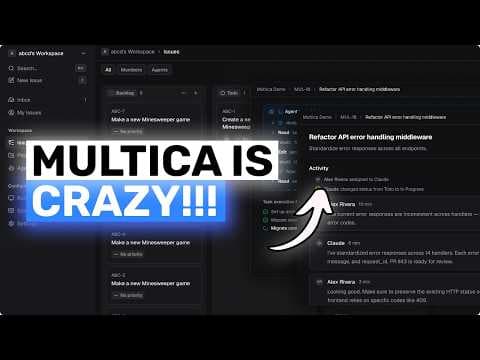
Multica: open-source GUI перетворює AI-агентів з кодування на членів команди
AICodeKing робить огляд Multica, open-source платформи для керування AI-агентами з кодування, такими як Claude Code та Codex, перетворюючи їх на членів команди з профілями, призначенням задач та спільними робочими просторами. Multica можна розмістити на власних серверах, що дозволяє користувачам контролювати додаток, базу даних та середовища виконання агентів, але потребує технічного налаштування та може залежати від зовнішніх сервісів для доставки електронної пошти та використання моделей.
Ключові тези
- Multica - це open-source платформа для керування AI-агентами з кодування.
- Платформа дозволяє самостійне розміщення для більшого контролю над даними та інфраструктурою.
- Вона підтримує декілька CLI агентів з кодування, сприяючи нейтральності до постачальників.
Контроль над даними: дані не покидають вашу інфраструктуру, що важливо для compliance. • Vendor neutrality: підтримка різних AI-агентів дозволяє уникнути залежності від одного постачальника. • Організація: централізована платформа для управління та координації роботи AI-агентів.
Самостійне розміщення Multica не означає, що ви самостійно розміщуєте базові моделі AI. Вам все ще потрібні API від Anthropic, OpenAI або інших постачальників, якщо ви не використовуєте локальні моделі.
Опис відео▼
[music] >> Hi. Welcome to another video. So, today I want to talk about Multica because this is one of the more interesting open source agent platforms I have seen in a while. If you use tools like Claude Code, Codex, Open Claw, or Open Code, Multica is basically trying to turn those coding agents into actual teammates instead of just terminal sessions that you babysit one by one. And that is really the main pitch here. Instead of copy-pasting prompts into a single AI tool all day, Multica gives you a shared workspace where agents can have profiles, get assigned issues, post updates, report blockers, and show up on a board like they are part of the team. So, if you ask me, this is less like a chatbot wrapper and more like an open source management layer for coding agents. It also leans into the idea of reusable skills, which is a big deal. So, if your team figures out a good deployment flow, migration flow, or code review pattern, that kind of thing can compound over time instead of every agent starting from zero on every task. Now, the thing that makes this especially interesting is that it is not just a cloud app. You can self-host it. And yes, I'm talking about actually self-hosting the platform on your own infrastructure, not just running a thin client that still depends on Multica Cloud behind the scenes. But I also want to clarify something important right away. If you run the default install path without any special flags, that connects you to Multica's hosted service. So, if your goal is no login via Multica Cloud and no dependency on their SaaS for the main app, do not use the default route. Use the self-hosted route from the beginning. That part matters a lot. So, what is Multica under the hood? It has a Next.js web front end, a Go back end, a PostgreSQL 17 database with the PG Vector extension, and then a local agent daemon that runs on actual machines where your coding agents live. The daemon is the part that detects which agent CLIs you have installed, like Claude Code, Codex, Open Claw, or Open Code, and then it executes tasks when the server assigns them. That architecture is pretty good for sure because it separates the management layer from the execution layer. The board, issues, comments, workspaces, and real-time updates live in the web app and back end. The actual coding work still happens on machines that you control. So, if you want your agents to run on your laptop, your desktop, a spare Mac mini, or a Linux box in your office, that is the kind of setup this is built for. And this is also where people can get confused. Self-hosting Multica does not mean the Docker containers magically do all the coding work for every agent. The server is self-hosted, yes, but the agent daemon still needs to run somewhere. Usually, that means each user who wants to run agents locally installs the Multica CLI and starts the daemon on their own machine. So, the platform is centralized, but the runtimes can be distributed. Now, let's talk about how to fully self-host it without using Multica Cloud for login. The easiest path is to use the official self-host installer with the {dash}{dash} local flag. That sets up the local server, Docker services, and CLI configuration for a self-hosted deployment. The other route is to clone the repo manually, go into the project folder, and run make self-host. When you run make self-host, Multica creates the {dot}env file from the example, generates a random JWT secret, starts the Docker Compose stack, and then brings up the front end and back end. By default, the front end comes up on localhost port 3000, and the back end comes up on localhost port 8888. So, once that is running, you open localhost:3000 in your browser. For a non-production setup, you can log in with any email address and the master verification code 888888. That is the local development shortcut, and it is very convenient for testing. Now, this is the key part if you care about avoiding Multica Cloud authentication. That browser login is going to your self-hosted Multica app, not to multica.ai, as long as your CLI and app URLs are pointed at your own instance. In the local setup, Multica uses localhost:3000 for the app URL and localhost:8080 for the server URL. So, yes, there is still a login flow, but it is against your self-hosted Multica deployment, not their cloud. After that, each machine that should run agents needs the Multica CLI and at least one supported agent CLI installed. So, if you want to use Codex, you need Codex on your path. If you want Claude Code, you need that installed. Same idea for Open Claw and Open Code. Then, you can just run multica setup {dash}{dash} local, and that one command configures the CLI for localhost, opens the browser for authentication, discovers your workspaces, and starts the daemon in the background. If you want to do it manually, you can run multica config local, then multica login, then multica daemon start. After that, you can check it with multica daemon status. Once the daemon is online, go into the web app, open settings, and then runtimes, and you should see your machine listed there. Then, go to settings and agents, create a new agent, pick the runtime you want, and assign that agent to a workspace. After that, create an issue and assign it to the agent. It should pick up the task automatically and start working. So, from a workflow point of view, what you really get is this: a board where humans and coding agents can share work, a back end that keeps track of tasks and status updates, and local or remote runtimes that actually execute the jobs, which is kind of great because this is way more structured than manually opening five terminals and hoping you remember what each agent was doing. Now, let's come to the production side because this is where fully self-hosting becomes more serious. For a real production deployment, you need your own PostgreSQL 17 database with PG Vector, a proper JWT secret, your front end origin set correctly, and ideally a reverse proxy with TLS. The docs show Caddy and Nginx examples, which is good. So, you would typically put the app on something like app.example.com and the API on api.example.com, then point your reverse proxy to the front end and back end services. On the front end side, you also need the API and WebSocket URLs to point to your own domain. On the CLI side, your users would set the app URL and server URL to your self-hosted endpoints. So, for production, the login still opens in a browser, but again, it is your browser talking to your domain, not Multica Cloud. That distinction is super important. Now, there is one more nuance here. For local and development setups, the magic code 888888 works, and the docs also say email codes print to standard output if you leave the Resend key empty. But for production authentication, Multica expects email-based magic links through Resend. So, if you want a real production-grade self-hosted login system, you need to provide your own Resend API key and sender email. Google OAuth is optional, not required. That means the platform is self-hosted, but you may still choose to use external services for specific pieces like email delivery. If you want to be extremely strict about self-hosting every single dependency, that is something to keep in mind. Multica itself is not forcing you to use Multica Cloud for auth, but production email delivery in the documented setup does rely on Resend unless you modify the auth stack yourself. The same kind of nuance applies to file storage. If you want S3 and CloudFront, you can configure that, but if you do not set an S3 bucket, there is a local file storage fallback. So, for smaller self-hosted setups, you can keep things very local. For larger or more polished deployments, you can plug in your own object storage and CDN. And here is another honest caveat. Self-hosting Multica is not the same thing as self-hosting the underlying models. The orchestration layer is self-hosted. The issue tracker, dashboards, workspaces, agent assignments, and runtime management can all live on your infrastructure, but the actual coding agents you use may still depend on Anthropic, OpenAI, or some other model provider, depending on which CLI you run. So, if your goal is total air-gapped autonomy, this alone does not solve that. Still, I think this is a really good option for sure if what you want is control. You control the app. You control the database. You control the domains. You control where the daemon runs, and you're not locked into one single agent vendor because Multica is built around multiple coding CLIs. That vendor neutral part is one of the nicest things about it. I also like that the daemon just detects available tools on your machine and registers them as runtimes. That is a much better model than forcing everybody into one blessed cloud environment. It means your team can have different boxes, different setups, and even different agent preferences while still working through one shared control plane. Now, is this overkill for some people? Yes, absolutely. If all you want is to open Codex on your own machine and have it edit one repo for you, then you probably do not need an entire managed agents platform. That would be like setting up a whole project management suite just to remember one grocery item. But if you are coordinating multiple repos, multiple agents, or multiple people with agents, then this starts making a lot more sense. Cost-wise, this is also worth thinking about. The software being open source is great, but you still have infrastructure costs, possible email provider costs for production auth, and most importantly, the cost of the actual agent tools or model usage behind Claude Code, Codex, or whatever else you connect. So, this is not free free. It is just much more flexible and much more under your control. I also like that the upgrade story is simple. Pull the latest changes, rebuild the Docker Compose setup, and the migrations run automatically on back end startup. That is the kind of thing that makes self-hosted software much nicer to live with. So, if you want the shortest version of how to self-host Multica without relying on Multica Cloud, it is basically this: Install it in local mode or run make self-host. Open your own app on localhost:3000. Use the local login flow there. Install the Multica CLI plus at least one supported agent CLI on each runtime machine. Run multica setup {dash}{dash} local or manually set multica config local, then multica login, then multica daemon start. And if you deploy it for production, point the app and server URLs to your own domains. Add TLS, configure your own database, and set up your own email auth provider. So, overall, I think Multica is pretty cool. It is not just another AI coding tool. It is more like infrastructure for running AI coding teammates in a way that is actually organized. And the fact that you can self-host it properly makes it way more compelling than tools that pretend to be open while still forcing you through their SaaS for the important stuff. It is not perfect, though. You still need real infrastructure. You still need to manage authentication in production. You still need compatible agent CLIs. And you still need to pay for the underlying intelligence somehow. But if you are okay with that, this is a very solid open-source option and one of the better takes I have seen on managed coding agents. Overall, it's pretty cool. Anyway, let me know your thoughts in the comments. If you like this [music] video, consider donating through the Super Thanks option or becoming a member by clicking [music] the join button. Also, give this video a thumbs up and subscribe to my channel. I'll see you in the next one. Until then, bye. >> [music]
Ще з цього каналу
UNLIMITED FREE MiniMax M2.7 + Hermes,OpenCode,Claude Code: This is THE BEST UNLIMITED FREE AI Coder!
3 місяці тому
Karpathy-Skill + Claude Code,OpenCode: This SIMPLE ONE-FILE SKILL Makes YOUR AI CODER WAY BETTER!
3 місяці тому
Hermes V0.8 (New Upgrades) + New Free APIs & Local Models: LOL OPENCLAW! This is JUST SO BETTER NOW!
3 місяці тому
Muse Spark + Claude Code: This FULLY FREE MODEL is A CRAZY FRONTEND BEAST!
3 місяці тому