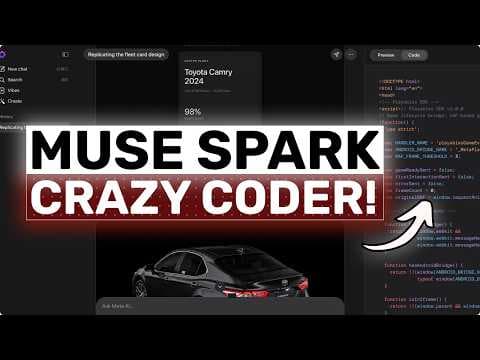
Muse Spark від Meta: безкоштовна AI-модель для копіювання дизайну інтерфейсів
AICodeKing зробив огляд Muse Spark від Meta, безкоштовної AI-моделі, яка чудово справляється з візуальними задачами, особливо з відтворенням дизайну інтерфейсів.
Ключові тези
- Muse Spark чудово копіює дизайн інтерфейсів з візуальних референсів.
- Модель може витягувати та повторно використовувати ресурси безпосередньо з вихідного дизайну.
- Вона позиціонується як швидкий фундамент для візуального кодування та генерації інтерфейсу.
Швидке створення прототипів інтерфейсу без знання коду • Автоматичне вилучення та використання ресурсів з існуючих дизайнів • Зменшення витрат на розробку фронтенду на 20-30% для малих проєктів
Muse Spark добре працює з чіткими візуальними референсами, але може бути менш ефективним з абстрактними запитами. Важливо надавати конкретні інструкції та приклади для досягнення найкращих результатів.
Опис відео▼
Hi, welcome to another video. So today I want to talk about Muse Spark because I think this is one of those models that can look a bit confusing if you judge it the wrong way. Now as I am making this in April 2026, Meta is positioning Muse Spark as the first model in this new Muse family. And from the way they are talking about it, it is clearly meant to be a small and fast foundation for bigger things later on. So if you go into this expecting it to be the one model that just destroys everything across every single task, I do not really think that is the right way to look at it. Because if you ask me, Muse Spark can feel average at some stuff. And I do want to be honest about that. On some general tasks, especially if you're thinking in terms of hardcore backend work, deep repo reasoning, very technical debugging, or just those cursed engineering tasks that need extremely strong logic throughout, it does not always feel like the strongest thing in the room. It is not bad, but it is also not the sort of model where I would immediately say, "Yep, this is my go-to for everything." But, and this is where things get interesting, the story changes a lot when you move into visual tasks. This is where Muse Spark starts to make a lot more sense. Meta is very clearly pushing it around visual coding, custom websites, and even miniames. And to be honest, I can kind of see why. Because when you ask it to work on front-end heavy stuff, especially when there is a clear visual target, it actually becomes pretty impressive. And the biggest thing I noticed is this. It is really good at replicating designs. If you give it a screenshot of a landing page, a dashboard, a hero section, or even some polished UI concept, and ask it to build something very similar, Muse Spark seems to understand the assignment quite well. A lot of models can get the rough layout right. But then they completely lose the feel of the design. The spacing becomes weird. The hierarchy becomes flat, the buttons look random, and the whole thing ends up looking like a cheap remake. Muse Spark, from what I have seen, does a better job of keeping the visual DNA intact. It tends to preserve the general composition better. It gets the section structure more accurately. It seems to understand that if a design is minimal, it should stay minimal. And if it is dense and modern, it should keep that same energy, which is honestly pretty good. And it goes even further than that. If you give it the original design, it can also cut assets straight from that design and use them in the output automatically, which is honestly insane. That means it is not just looking at the layout and vaguely copying it. It can actually pull visual pieces from the source design itself and then reuse them while building the front end. That makes the whole replication workflow way more practical because now you're not manually rebuilding every little decorative element or hunting down each asset one by one. So if your main use case is something like here's a design reference now recreate this in code then musepark is actually a really good option for sure. And that is important because this is one of the most practical AI coding workflows right now. Most people do not need some model to invent a totally new software architecture from scratch every 5 minutes. A lot of people just want to take a mockup, a dribble shot, a screenshot, nice spacing, maybe some glassy panels, a sidebar layout, and a couple of visually distinct sections. It usually does not flatten everything into one boring output. It tries to keep the structure and style closer to the reference, and that matters a lot. Now, I'm not saying it is some magical oneshot front-end god that will always give you pixel perfect production UI. Take that with a grain of salt. Sometimes the typography may still need work. Sometimes the responsiveness may need refinement. Sometimes one section looks great and another section feels a bit off. So there is still cleanup involved, which is also fine because that is true for almost every AI coder right now. But the first draft quality for visual work is pretty good. And that is really what I care about because if the first draft already captures the right visual direction, then refining it is easy. What wastes time is when a model completely misses the look and feel and then you have to spend 10 extra prompts just trying to drag it toward the correct design language. Museark seems to reduce that problem, which is kind of amazing. So, if you are a front-end person, an indie hacker, a designer who wants code, or just someone trying to replicate a UI quickly, I think Newspark is worth paying attention to. The best way to use it, if you ask me, is very simple. Do not be vague. Do not just say, "Make me a beautiful website." Instead, give it a screenshot or a design reference. Tell it what stack to use. Tell it to keep the layout and visual hierarchy close to the original. Tell it to make it responsive. Tell it which parts must stay similar and where it is allowed to improvise. If you do that, Muse Spark becomes much more useful. That is also why I would not judge it too harshly on random abstract prompts alone. Some models are better when you just throw raw ideas at them. Muse Spark to me feels like a model that becomes more valuable when the task is grounded in visuals. When there is something to see, something to mimic, something to structure, that is where it starts to shine much more. Now if your workflow is mostly back-end APIs, database heavy applications, infra debugging or large codebased maintenance, I do not think this would be the first model I would pick based purely on that. It might be average that compared to stronger coding first models, but for front- end and design replication, it is honestly pretty solid and I think that is a better way to frame it. Muse Spark is probably not the model that wins because it is the best at everything. Muse Spark is interesting because it seems to know its lane. Its lane is visual understanding, front-end generation, and recreating designs in a way that feels closer to the original than what a lot of other tools usually give you. So, if you use it for that, then I think you're using it the right way. And if you try to force it into being your absolute everything model, then maybe you will walk away underwhelmed. That is basically my honest verdict here. It might be average at some stuff, and that is okay. But when it comes to replicating designs, doing visual work and generating good front end, Muse Spark is genuinely good. In that area, it actually stands out. And I think that is what makes it worth talking about. And what makes this even more useful is that you are not limited to just looking at the result inside Meta AI site. You can actually download the generation from there and then take that front end further in something like Verdant to build out the back end and everything else as well. So if Muse Spark gives you a really solid visual starting point, you do not have to stop at the pretty UI stage. You can take that generated code, move it into a more full stack workflow, connect your database, add authentication, wire up APIs, and basically turn that nicel looking front end into a proper application. That is honestly a really good combo because then Muse Spark handles the part it seems strongest at, which is the visual and front-end side, and then Verdon can help you expand that into a more complete product. So instead of thinking of Muse Spark as the one tool that has to do absolutely everything, you can use it as the designheavy first step in a workflow that gets you much further. Overall, it's pretty cool. Anyway, let me know your thoughts in the comments. If you like this video, consider donating through the super thanks option or becoming a member by clicking the join button. Also, give this video a thumbs up and subscribe to my channel. I'll see you in the next one. Until then, bye.
Ще з цього каналу
UNLIMITED FREE MiniMax M2.7 + Hermes,OpenCode,Claude Code: This is THE BEST UNLIMITED FREE AI Coder!
3 місяці тому
Multica: This OPENSOURCE GUI CONVERTS AI Coding Agents into TEAMMATES!
3 місяці тому
Karpathy-Skill + Claude Code,OpenCode: This SIMPLE ONE-FILE SKILL Makes YOUR AI CODER WAY BETTER!
3 місяці тому

Hermes V0.8 (New Upgrades) + New Free APIs & Local Models: LOL OPENCLAW! This is JUST SO BETTER NOW!
3 місяці тому