RunwayML Gen-2: використання людських облич та розширені підказки
Відео розглядає нові функції RunwayML Gen-2, зосереджуючись на можливості інтегрувати реалістичні людські обличчя у відео та розширені техніки промптингу. Також охоплено оновлення інтерфейсу, інструменти масштабування та поради для досягнення кращих результатів відео.
Ключові тези
- RunwayML Gen-2 тепер підтримує реалістичні людські обличчя у відео.
- Інтерфейс включає опції для звуку, співвідношення сторін та роздільної здатності.
- Topaz AI інтегровано для масштабування до 4K.
- Використання посилань на персонажів та таблиць виразів покращує консистентність.
- Детальні підказки з таймкодами покращують якість відео.
Персоналізований контент для маркетингу за $0.05/секунда • Швидке створення відео без акторів та знімальної групи • Інтеграція з Topaz AI для автоматичного покращення якості відео
Якість генерації облич все ще може бути не ідеальною, і потребує додаткового контролю. Важливо перевіряти згенеровані відео на артефакти.
Опис відео▼
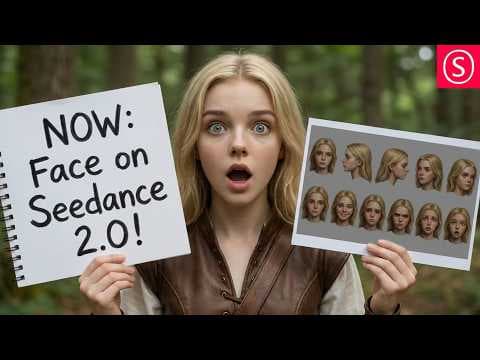
[music] >> Hello my friends and how are you doing? Here's another video, a really important update about C Dance 2 on Runway because now they actually allow that you use human faces, images of human faces that are also realistic in the videos, which of course is super important for the consistency, but also it's important because now you can use yourself or any kind of other image, but of course only images you have the rights to, so that's important. Also, I noticed I didn't really show you the full interface yesterday and I want to give you some tricks on how to get way better results. So, first of all, let's start with the interface here. Down here, you have a couple of buttons that are important to you. The first one here is the sound on or off. This decides if sound is created with the video or not. You can also see here that when you use credits, generation of 15 seconds costs 540 credits. Then also here, you have the different ratios you can have. There's also very cinematic 21 by 9 ratio here, but of course also you can create for example shorts for the different social media pages with 9 by 16 and so on. The resolution is only 480 or 720, but Runway has an included upscaling tool. You can see here with this button you can automatically upscale it to 4K with Topaz AI, which is one of the best video upscaling tools on the market. And of course it's running on their server, so you don't actually have to have a good GPU. Then you can select between 5, 10, and 15 seconds. Also, yesterday I was asked about the unlimited batch recording. I did a timer and I got about 9 minutes wait time for the batch to start and you can have two videos in the batch at the same time. Now, here is the advice on how to get way better video. First of all, one thing I want to advise to you is put into your prompt, don't add music because the AI C Dance 2 will automatically create some film music, which often is really amazing, but at the same time then you can't put your own music and the music is only always short, so maybe replace that with something you create in Suno or stuff like that. Now, another thing you can do here and I found that quite effective is when you want to use the last frame. You can use the last frame as you can see here. This is from the last video I've generated as a screenshot. You can actually export that. You can see here use frame and then say use frame as reference. Now, one thing you want to do as soon as you have it, you want to click here on this little field and give it a name because then you can call it in the prompt with the name. And you can also do these character references. Now, here is one thing I want to advise to you to create that. First of all, one thing you can do is with Nano Banana, if you have a character, say you want to have only the face and then you want to have the rotation of the face from the front, the left, the right, and then also these angles, 45° to the left, to the right, maybe also from behind if the hairdo is necessary for that. And then in my case, I also wanted to have several face expressions here. This is called an expression sheet and this will also give you a certain consistency over the like emotional expressions and the model knows what the face looks like in different facial expressions. Then, of course also you want to have a character sheet like that with the front and the back ideally, so you see what the clothing looks like. In this case, I also have a second character with it, which is the wolf, which also has these bags on both sides and that can then also be picked up by the model and you can use this in every scene even though the last frame might not have, like in this case, the face in there or it might not have the character in there at all, but the model can still do that. But you can of course also not use the last frame and just use the character references. This will actually, from my experience, make the video a little bit more dynamic, a little bit more cinematic maybe, but the problem here is if you don't do that then the video might have a different scenery, it might have a different location, it might have a bit of a different color style, stuff like that. So, using the last frame or actually last seconds of the video, you can also do that by cutting that out and uploading that, this can actually help preserve that style and also preserve the location. Now, another thing you want to do here because you use this last frame is that in the prompt you can use the @ sign and then name that part. So, let me show you. When I press @ here and start to write, it will actually pop up the scene and then I can click on that and it will put that in here. So, with that I can actually name that specific input image as a source and what I want to do with that. And because of that, what I'm doing here is to say use this one, last one only as a style reference, which means that it's not going to be used in the video as the first scene, but it also doesn't have an impact on the dynamic of the video. This is really, really helpful. And then also, I say use the character reference. Again, I'm referencing this image up here and the expression sheet here, expression as character guide so that the character actually looks like that in all of the scenes and doesn't like switch between different kinds of looks, right? And of course then afterwards you want to have a detailed time code with description of the different scenes in here. Another thing to point out here is if you use for example ChatGPT or things like that to create that prompt like I do, read through the prompt and read what it actually says, if these are the actions you want to have and if the characters who do these actions are actually described in the scene. So, the better you prepare this prompt and the more descriptive it is for the actual action, the less you have to re-render these scenes for your video. And of course this saves either time or credits depending on what kind of mode you choose, right? So, that is very, very useful and like I said, the big news is that you can now use faces, which is amazing. It works really well and now you can go out and make your own movie or show or anything you like. Thank you very much for watching. See you soon and bye. >> [music]