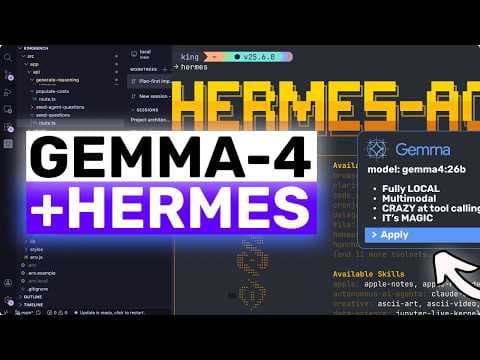
Google випустила Gemma 4, нову родину відкритих моделей для локальних AI-агентів
Google випустила Gemma 4, сімейство відкритих моделей, побудованих на тих же дослідженнях і технологіях, що й Gemini 3, і стверджує, що це найпотужніша родина моделей, яку можна запустити на власному обладнанні. Моделі підтримують розширені міркування, виклик функцій, структурований вивід JSON, власні системні інструкції, довгі контекстні вікна, мультимодальне введення та понад 140 мов.
Ключові тези
- Gemma 4 поставляється в чотирьох розмірах: E2B, E4B, 26B mixture of experts і 31B dense model
- Модель 31B посідає третє місце серед відкритих моделей у текстовій таблиці лідерів Arena AI, а модель 26B — шосте
- Gemma 4 можна запускати локально через Olama та використовувати з Hermes agent і OpenClaw
Локальний запуск без залежності від хмарних сервісів • Apache 2.0 ліцензія для вільного використання та модифікації • Підтримка агентів для автоматизації задач
Попри заявлену відкритість, для повної реалізації Gemma 4 може знадобитися значне обчислювальне обладнання, що обмежує її доступність для широкого кола користувачів. Також, інтеграція з Olama, Hermes agent та OpenClaw вимагає певних технічних навичок.
Опис відео▼
Hi, welcome to another video. So, Google has launched Gemma 4 and I think this is one of the most interesting open model releases they have done so far. This is their new open model family built from the same research and technology as Gemini 3. And they are saying that Gemma 4 is the most capable model family you can run on your own hardware. And honestly, at least on paper, it really does seem like that. It is also now under Apache 2.0, which is a really big deal for people who actually care about using open models properly without weird licensing headaches. Now, I am saying seems because of course benchmarks are not everything. Real world usage can always differ a bit depending on your prompt, your hardware, your quantization, and your exact use case. But still, the official numbers and the positioning here are kind of wild. Gemma 4 comes in four sizes. There is the E2B, the E4B, the 26B mixture of experts model, and the 31B dense model. The really interesting part is that the 31B model is currently ranked as the number three open model on Arena AI's text leaderboard, and the 26B model is ranked number six. Gemma 4 is even beating models up to 20 times its size there, which is a massive statement. So, when people say that Gemma 4 might be the best model for the size that can run locally, I actually think there is a good case for that. now. And the reason is not just raw benchmark hype. It also has the features that actually matter for local agent use. It supports advanced reasoning, function calling, structured JSON output, native system instructions, long context windows, multimodal input, and over 140 languages. So this is not just a small chatbot model. This is actually something you can plug into real local agent workflows. The 26B model only activates around 3.8 8 billion parameters during inference because it is a mixture of experts model. So that one in particular looks like the sweet spot for a lot of people. You get a model that is still very strong, still agentic, still good for coding and reasoning, but way more realistic to run locally than some giant monster model. And then if you want the best quality, there is the 31B dense model. If you want something lighter, there are the E2B and E4B edge models for smaller devices and lower memory setups. So overall this lineup actually makes sense. Now the bigger question is not just is Gemma 4 good. The bigger question is how do you actually use it in a way that is useful? And this is where Olama Hermes agent and openclaw come in. Because if you ask me that is the real value here. You can run Gemma 4 locally through Olama and then use that same local model with proper agents instead of just chatting with it in a terminal window. That is what makes this cool. So let's start with Olama. Ola already has Gemma 4 available and you can run it with simple commands like Olama run Gemma 4 2B, Olama run Gemma 4B, Olma run Gemma 4 31B. If you have weaker hardware then obviously go with the smaller models first. But if you want the one that I think most people should actually care about, it is probably Gemma 426B. That is the one that gives you the most interesting balance. It is strong enough to feel like a serious model, but still practical enough that local people will actually try to run it. And if you do have a stronger setup, then you can go for Gemma 4 31B, which should give you the best output quality. Now, once you have Gemma 4 running in Lama, you can use it with Hermes agent. So, the setup is actually pretty simple. First, pull the model you want in Lama. For example, Alama pull Gemma Fortist 26B. Then make sure Alama is serving. If you want a decent context length for agent work, it is a good idea to start it with something like context length equals serve because low context is one of the main things that can make local agent setups feel dumb. After that, in Hermes agent, just run Hermes model. Choose the custom endpoint option. Enter http post/lohost11434v1. Skip the API key and type your model name like gemma4206b. That is basically it. And this is where Gemma 4 becomes much more interesting than just another local model release because Hermes agent is not just a chat UI. It is an actual agent shell. It can work with tools, custom providers, MCP servers, memory systems, and all that good stuff. So now instead of just asking Gemma for random questions, you're using Gemma 4 as the brain inside a more complete local agent workflow. This is especially interesting because Hermes agent works really well with local Alma setups for privacy sensitive work offline use and quick experimentation. So if your goal is to keep things local and avoid paying for every single token, this is a very good match. Now one thing to keep in mind here is that local agent work needs enough context. If your context window is too small, then the agent starts forgetting tool schemas, forgetting earlier instructions, and just generally acting worse than the model actually is. So if somebody tries Gemma 4 in Hermes agent and thinks it is not good, it may literally just be because they are running Alama with a tiny context window. So do not skip that part. Now let's come to OpenClaw because I think this is also a really strong use case. OpenClaw is basically one of the coolest open-source personal AI assistant projects right now. It can connect to local or cloud models, run agent tasks, use tools, and actually do useful things for you instead of just generating text. And OpenClaw has direct Alma support. This is important because OpenClaw does not just treat Alma like some generic OpenAI clone. It actually supports Alma's native API, which means better streaming and much more reliable tool calling. So if you want to use Gemma 4 with OpenClaw, the clean way is this. Install and run Alama, pull Gemma 4 and then run OpenClaw on board. When it asks for a provider, choose Alama, then point it to your Alma base URL, which is usually http127.0.01434. And this part matters a lot. For Open Claw, you should not use the V1 OpenAI compatible URL. You should use the plain Alma base URL without V1 because the native Alma API is what gives you reliable tool calling. That is actually a really nice touch. But OpenClaw can also autodiscover your local O Lama models. So once Gemma 4 is pulled, it can show up in the model list and be used as your default model. And that is exactly why I think Gemma 4 matters more than some other open model launches. It is not just good in theory. It plugs into workflows people actually use. Now, if you cannot run Gemma 4 locally or you just want to test it before committing to a bigger setup, there's also another good option. Nvidia has Gemma 431pb available through Nvidia NIM and you can try that hosted NIM API for free for prototyping. So, this is kind of amazing as well because now you have two paths. If you have the hardware, run Gemma for locally with OAM and use it inside Hermes agent or OpenClaw. If you do not have the hardware, you can still try Gemma 431b through the free Invidian Nim API and see how it performs for your use case. And NIM is also very convenient because Nvidia's language NIM APIs use an OpenAI style chat completions endpoint. So for tools and apps that support OpenAI compatible providers, this can be a pretty easy fallback path. Of course, that second route is not local anymore. But it is still a very nice way to test Gemma 4 without needing a giant GPU sitting beside you. So if I had to summarize this whole thing very simply, I would say this. Gemma 4 is probably the first Gemma release where I feel like Google has really nailed the combination of size, capability, agent support, and local practicality. The E2B and E4B models are there for edge devices and lighter systems. The 26B model looks like the real sweet spot for most local power users, and the 31B model is there if you want the strongest version and have the hardware for it, or if you want to try it through NVIDIA NIM first. And once you combine it with Olama plus Hermes agent or OpenClaw, it stops being just another benchmark model and starts becoming an actually useful local AI stack. That to me is the main story here. So yes, right now Gemma 4 really does seem like one of the best and maybe the best open models for the size if your goal is to run something locally and actually use it in agent workflows. Overall, it's pretty cool. Anyway, let me know your thoughts in the comments. If you like this video, consider donating through the super thanks option or becoming a member by clicking the join button. Also, give this video a thumbs up and subscribe to my channel. I'll see you in the next one. Until then, bye.
Ще з цього каналу
UNLIMITED FREE MiniMax M2.7 + Hermes,OpenCode,Claude Code: This is THE BEST UNLIMITED FREE AI Coder!
3 місяці тому
Multica: This OPENSOURCE GUI CONVERTS AI Coding Agents into TEAMMATES!
3 місяці тому
Karpathy-Skill + Claude Code,OpenCode: This SIMPLE ONE-FILE SKILL Makes YOUR AI CODER WAY BETTER!
3 місяці тому
Hermes V0.8 (New Upgrades) + New Free APIs & Local Models: LOL OPENCLAW! This is JUST SO BETTER NOW!
3 місяці тому