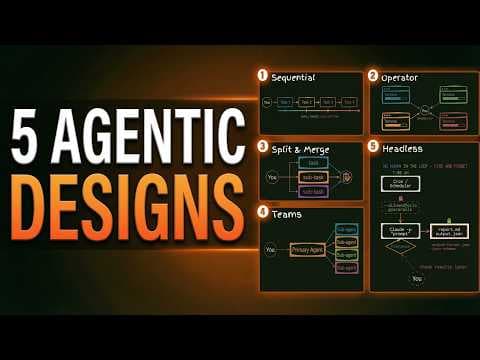
Повний огляд workflow в Claude Code: від базових до автономних
Відео пояснює п'ять різних workflow для використання Claude Code, від простих послідовних до повністю автономних. Підкреслюються переваги та обмеження кожного підходу, а також важливість використання вбудованих субагентів Claude та кастомних команд агентів для оптимізації виконання завдань і співпраці.
Ключові тези
- Claude Code пропонує п'ять шаблонів workflow: послідовний, оператор, розділення та злиття, команди агентів і headless.
- Кожен шаблон відповідає різним рівням складності завдань і потребам у співпраці.
- Розуміння цих шаблонів дозволяє користувачам оптимізувати використання Claude Code для максимальної ефективності.
Паралелізація задач: пришвидшення розробки до 5-10 разів при правильному використанні • Автоматизація рутинних процесів: headless workflow для задач, які легко перевірити • Командна розробка: agent teams для складних проєктів з інтеграцією різних спеціалістів
Ефективність залежить від правильного вибору workflow. Не всі задачі потребують команд агентів, а неправильний вибір може призвести до зайвих витрат токенів.
Опис відео▼
If you're still using claw code one conversation at a time, you're using it wrong. And this video is going to change how you work with it. So, at the moment, you give it a task, you wait for the result, and then you move on to the next task. Everything's running at one time. But that's not how you'd run a team. You'd run teams in parallel, and you'd bring in specialists when required. And claw code is built to work exactly like that, too. But most people aren't using it that way. So, in this video, you'll see five ways on how to actually use it, from simple setups to fully hands-off workflows. so that you can stop working in one conversation and start saving some serious time. So, let's get into it. And I'll start off with something that surprised me when I first found out about it. So, every single time you use clog code, even in a basic conversation, it's already using a version of these patterns that we'll run through behind the scenes. So, it actually has already built-in sub aents that it uses automatically without you having to tell it to. So, there are actually three built-in sub aents baked into claw code. The first one is called explore. And explore is basically a fast cheap scout. So it runs on haiku which is anthropic's fastest and cheapest model. And all it can do is read your files. So it can search your files. It can look through folder structures. But it's read only. It can't change anything. So when you ask Claude something like how does my user authentication work in this project? Then Claude will often spin up an explore agent behind the scenes without you asking to. It will go off read through your files with its own set of context window and it will come back with a summary and your main conversation therefore can stay clean. It doesn't bloat the context. And you'll actually see this inside the terminal when you run these tasks. You'll see it pop up in the terminal as the explore tool. The second one is similar. It's called plan, but it specifically activates when you're in plan mode. So if you type / plan or hit shift tab twice to enter plan mode, then Claude is going to use the plan sub agent to research your codebase before it presents you with a strategy. Again, separate context window, readonly. And the third one that they've implemented behind the scenes is general purpose. And this, as it sounds, is quite general purpose. So, it's the one that does the heavy lifting. It runs on Sonnet and it has full tool access. So, it can read and write. And Claude uses it for complex multi-step tasks. So, if you're asking Claude to do something that requires both exploring the code base and making changes across multiple files, that's when it will often delegate that to a general purpose sub agent. And the key thing here is you've not told it to do anything. And Claude is deciding when to use these automatically. It's looking at the complexity of your task and routting it to the right sub aent. And all of those sub aents run with their own context window so that your main conversation never gets bloated with all the reading and searching of those files. So even before we get into the five patterns, just know that claw code is already doing some of this work for you. But when you understand the full spectrum of the patterns, you can take control and get so much more out of it. Okay. So with that context, let's start at the beginning with pattern one. And sequential flow is exactly as it sounds. You open a terminal, you start a claw code session, and every task you give it builds on the last one. So we've got you here. We assign a task. We then move to the next task. Once task one is finished, move to the next. Move to the next. And our shared context is growing over time. So it's building on the context that we've been given it throughout the different tasks. So it might be something like build me a landing page. Claude then builds it as task one or a first version of it. You say add a hero image to page one. Add a contact form. All of these are different tasks that build on the first task. And the output of task one can feed into task two. And the outputs of task one and two can feed into task three because it's all stored in the context window. And this might seem like you're not using any sub aents, but remember that Claude has those built-in sub aents. So even in this single conversation, Claude might spin up its explore plan or general purpose agents that help by actually offloading some context at the right time to get stuff done faster or more effectively on your behalf. And you'll see these pop up in the terminal, but from your perspective, it's still just one conversation flow between you and Claude. Now, the really important thing to understand about sequential flow is that it has a ceiling and that ceiling is dictated by the context window and that's shown by the little green bar on the bottom of the terminal. So the longer you work in that one session, the more the context is going to accumulate. And at that point, Claude starts forgetting things or not being able to find things, which is what we call context rot. So this is where skills and commands become super valuable because if you've got a well structured claude.md and some well ststructured skills that are described well, then Claude is able to load in that skill and any reference files at the right time and then offload it at the right time also to not bloat the conversation window. And then using commands like /clear and /compact will help you actually keep the summary of the conversation in the context. But eventually with this you're going to hit a wall and that's when we need to move to pattern two. And pattern two is called the operator. And this time you are acting as an orchestrator. So instead of running one clawed session, you're going to open up multiple terminal windows. You might have found yourself doing this already to get things done quickly. Each has its own clawed instance. So you can treat these like separate agents. terminal 1 2 3 and four completely separate agents. They have their own context window and therefore you can give them specific context for a specific task. So this time let's say you're building out a SAS app. You need a new onboarding flow built. You also need your checkout bug fix and you want to experiment with a new design for let's say your user settings page. All of these tasks that we've mentioned don't depend on each other. And that's one of the reasons why we can actually orchestrate these in completely separate terminals that don't blow each other's context because there's no connection between those terminals. We are purely coordinating. So you open three terminals like this inside VS Code. And Claude actually has now a built-in flag to do this much easier. So in the first time we type in claude-w which is important new onboarding flow. The second one claude-w checkout bug and the third one claude-wesign user settings. And you'll see that in the project folder here, we've now opened up what's called a work tree where we've got new onboarding flow, fix checkout bug, and redesign user settings. And now if we go into our doc cloud folder, we've effectively got these different work trees, which is a separate copy of your project with its own branch, and it drops it straight into the claw code session. Each one in its own isolated workspace, and they can't interfere with each other. So they all have a clean context window, so there's no context rot from other tasks. and us as the operator are the ones coordinating the efforts between these different terminals here. So you're probably at this point checking in on the different terminals, the different tasks going on. You're copy and pasting findings from one to another if you're needed and then you're going to have to decide when each one is done and when you want to merge that back into the main project. But this is a massive upgrade from this sequential flow because actually we can get multiple things done in parallel as long as they're not dependent on each other. But if they do depend on each other, then this flow isn't going to work for us. And here's the nice touch about closing a work tree session. As soon as we close this window, Claude is going to handle the cleanup for us. So if nothing's changed, it removes that workspace automatically. But if there is work to keep, then it's going to ask you what to do. And you can see as I close these sessions, they disappear from the work trees up here. So the operator pattern is you running multiple clawed sessions in parallel, each with its own isolated workspace, but you're still the one coordinating. So, it's perfect for independent tasks where you want maximum control and clean context windows where they will not interfere with each other. Now, the operator pattern is great, but as you'll have probably noticed, you can only manage a certain number of terminals at any one point. Four to five terminals and you're flicking between those terminals, it becomes really difficult checking in on all of the sessions. So, what if the claw could actually handle the parallel tasks itself? So, pattern three then is the split and merge. And this is where it gets really interesting because the core idea is that within a single claw code session one terminal claw itself can split work across multiple sub aents that then run in parallel. So if you're thinking about all four of these terminals we could effectively spin off multiple sub aents inside each terminal to get more done quicker. And then effectively at the end it's going to merge all the results back into the main agent so that you can reap the rewards. And if you remember those built-in sub aents I mentioned earlier, explore, plan, and general purpose. Those are good examples of that. But you're not limited to just those. You can create your own custom sub aents inside your doc folder. And Claude can spin up multiple of them at the same time. And here is how that works in practice. You give Claude a task. Claude is going to analyze that task and realize that it can be broken down into independent pieces. It will then fan out into multiple sub aents, each one running in its own context window. and each one focused on their specific piece of work. And then when it's all done, it will merge all those results automatically and give you the final output. So, a lot is happening in the background here that we don't have to manually tell it to do. So, let's say you ask Claude to research five different competitors for a client proposal. Instead of researching them one by one, which could take ages if we ran it in that sequential flow pattern one, Claude can spin up five sub agents, one per competitor, and they all research simultaneously. So each one is going to come back with their findings and the main agent is going to synthesize the five findings into one single report. And Boris Churnney even one of the creators of core code has talked about sometimes spinning up 15 sub aents at a time to get things done. But actually the limit on this is 10 at once. So 10 sub aents at once. Claude will actually cue any additional tasks as additional sub aents. But here's the critical limitation here. Sub agents can only report back to the main agent. So they can't actually talk to each other. So sub agent one and sub agent 3 have no idea what each other are doing. It's this like hub and spoke methodology where the main agent or our main instance where we're interacting with Claude is acting as the hub and it's receiving information back and forth from that sub agent. And if you've ever used the framework GSD or get done by Tash, this is like a framework I'd highly recommend for comprehensive projects. is basically a planning framework that will split your initial project brief into subtasks and execute on those subtasks for so it's designed for big projects but not in an enterprise fashion. We can look at their agents inside their agents folder. They've got quite a few agents in here and actually what you can do is go into the agents listed and see exactly like we do with skills the name the description. So researches a single gray area decision and returns a structured comparison table with rationale. So we're effectively giving this agent a role to do and a specific set of context that it goes out and performs a certain process as well as giving that agent a certain set of tools that it actually has access to. Now Claude will read the name of all agents in our docord folder and decide when it's suitable to offload a task to those sub agents. I.e. it will automatically use it when it thinks the task matches the description. Or you can specifically say I want to use the advisor researcher sub agent in this task. And one of the most powerful applications of this pattern is the build a validator chain. So you have one sub agent build something and then you have another sub agent actually review it. But what that requires is the sub aent one to build it first, pass it back to the main agent, pass that to the second sub aent through here and then that passes the results back to the main agent. So you can see because they can't communicate with each other that we're actually orchestrating it through this main agent. But you can effectively get a built-in quality check without doing any of the reviewing yourself by using that builder validator chain. So split and merge is claude doing the parallelization for you within a single session. So it can fan out work to those sub aents and merge the results for you. And again they keep your context window clean. So this is really powerful. So split and merge is awesome but it has one limitation. Sub agents can't talk to each other. So everything has to funnel through the main agent and for some tasks that is a genuine bottleneck. So what if your researcher agent needs to check in with your reviewer agent? Or what if you have a front-end developer that needs to coordinate with a back-end developer. So this is where the fourth pattern comes in, which is agent teams. An agent team is effectively a team of agents, as it sounds, that can share findings, challenge each other, and adapt together. So that the way that they share information is through a shared task list. So they're no longer interacting with the team lead, which is our main orchestration window. They're interacting with that shared task list. Agent one understands what tasks agent two is doing. And vice versa, they can send messages between the agents. And it's the most advanced coordination pattern. It's the newest addition to CL code and it is genuinely a gamecher for complex projects, but it should only be used in complex projects because the token usage is extremely high when you've got cross collaboration between the agents. Now, this is completely still experimental. It shipped with Opus 4.6 as a research preview. So, you need to still enable it by adding a flag to your settings.json, which is claw code experimental agent teams one. and you need to add that as an environment variable in your settings.json. But once it's enabled, you just tell Claude in your prompt that you want to use an agent team. So you must still specify that you want to use an agent team, not like sub agents where it will choose those automatically. You go in, you describe the task you want, you describe the team structure or Claude will actually determine the team structure itself and Claude will then create that team, spawn the teammates and coordinate the work. And in your terminal, you can actually navigate between the teammates using shift up and shift down. And you can message directly any teammate and bypass this team lead entirely or you can talk directly to the team lead. Now, as I mentioned, they use significantly more tokens because we've got this back and forth between the shared task list, the team lead, between the agents. And each teammate is its full CL code instance with its own context window again. So, it's got a portion of the main context passed in it from that shared task list and the team lead. And they roughly estimate it's going to be four to seven times more tokens than a single session when you're actually using agent teams. And the thing that actually matters here is you don't need agent teams for most of your work. You should actually only reach for them when sub agents or even a single session couldn't do the job. So say you're trying to build out a complex SAS application where you have a front-end developer, a backend developer, and then a testing developer that spins up tests and needs to communicate to agent one and two as they build. That is an example where you would actually want an agent team to save from back and forth between the orchestration layer. But a lot of people in the community are just saying that actually this is just a way to produce large quantities of work very quickly which isn't necessarily a good thing. You still need the work to be the right work. So it's powerful but expensive. So only reach for this when the task genuinely needs that cross collaboration. So patterns 1 through 4 all have one thing in common. You're there in the terminal. you're either typing, coordinating, or at least watching the task. But what if you didn't need to be there at all? So, this brings us on to the last pattern, which is Claude working without you. So, this is the dream of autonomous workflows, where you don't need to be in the loop. You just set a task, you walk away, and you come back to the results. And this is called headless. And it's where Claude code goes from being a tool you sit with to a team member that's going to go and work independently. This requires you having no conversation back and forth, no terminal window open, and no human in the loop at all. So when we're running this, we're using the -p flag. So we're saying Claude-P, and we're entering a prompt after the P flag. So we're saying, Claude, process this prompt. We don't want any interaction, no approvals. You've got full permissions. Just go get it done and return to me the result when you're finished. And that on its own is kind of iterating with that task cla prompt and will give us that report.json. But when it gets really groundbreaking, when it gets really powerful is like when you plug this into other systems. So if you plug this in to your Windows or your Mac scheduling function, your cron functionality that can say at 7 a.m. every day, fire in this command to my terminal and then Claude goes and iterates and gets the report and sends it back to you. That is when it genuinely becomes a gamecher because then what we're doing is actually creating workflows that can run on a schedule without your input. So it could be review yesterday's work and write a summary to a morning report.mmd. So when Claude wakes up, it's going to read all the work you did yesterday, analyze them, write the report, and then you just have to go and look at the output before you've even done anything. You didn't open a terminal, you didn't even type a prompt in. It basically just happened. Or say you're actually running content for your business. You could have a script that pulls your latest video transcript, runs it through Claude with a specific prompt, gets you back a set of social media posts, saved to a file that you can then just schedule automatically. And you can chain these together. You can add skills into the prompts that invoke specific skills. And this is all completely automated. Now, the big limitation in this is trust. You're not asking for an iterative conversation. You're giving Claude autonomy to do things on your behalf. So, you're not checking each step. So, this works best for tasks where the output is extremely easy to verify. At the moment, you probably don't want to go headless on anything that's hard to undo, but you can actually put guard rails on this as well. If you want it to only read and not write, for example, we can do d-allowed tools and then make sure that we add specific things that it can do. And some people in the community have taken this even further with things like the Ralph loop, which keeps feeding the same prompt back in so that Claude iterates on its own work until it gets it right. And each time it iterates, it understands what has been done in the last cycle. And people have actually been using this to ship entire projects overnight. So this is brilliant. This is like claude working without you. You set a task, you walk away, and you come back for the results. But like we said, it's best for batch processing things and anything where the output is really easy to verify. So there you have it, five agentic patterns for claw code. And if you want to go deeper on any of these or on building skills, creating custom sub agents, how to structure your claw MD and actually put these patterns into practice with real projects, then check out the first link to the Agentic Academy in the description below. We've got a full claw code track where we build this stuff step by step. And let me know in the comments which pattern you're looking forward to trying. And if this did save you the time of figuring out this yourself, then I'd really appreciate a like and subscribe. Thanks so much for watching.