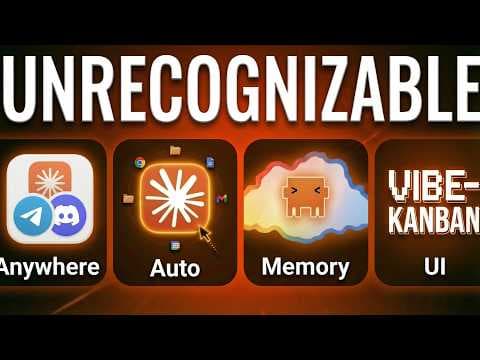
Не залишайтеся позаду! Оновлення Claude Code квітень 2026 – що CEO потрібно знати
У першому кварталі 2026 року Anthropic випустило ряд оновлень Claude Code: дистанційний доступ через Telegram/WhatsApp, режим авто‑підтверджень, хмарні планувальники та оптимізацію пам’яті. Тепер асистент може працювати автономно, а керування йому доступне з будь‑якого пристрою. Це перетворює Claude Code на легковісну ОС для роботи, доступну навіть не‑технічним користувачам.
Ключові тези
- Дистанційне керування через QR‑код або URL дозволяє продовжувати сеанс Claude з телефону або браузера.
- Режим авто‑підтверджень використовує класифікатор для автоматичного схвалення безпечних дій, скорочуючи ручні запити.
- Планувальники тепер працюють в хмарі, тому workflows продовжують працювати навіть при вимкненому комп’ютері.
- Автодрім підрізає файли пам’яті після 24 годин та 5 сеансів, залишаючи контекст компактним і швидким.
- Нові інтерфейси (Telegram/Discord/iMessage канали, комп’ютерне керування, візуальні UI) дозволяють не‑розробникам керувати AI‑агентами.
🟢 Можливості — одразу підключіть канали Telegram/Discord до Claude Code, щоб отримувати сповіщення та задавати завдання з телефону; налаштуйте хмарні планувальники для щоденних звітів і резервного копіювання. 🔴 Загрози — залежність від одного постачальника AI може створити точку отказа; також можливі ризики безпеки при неправильному налаштуванні правил авто‑підтверджень.
Деталь, яку часто пропускають: режим авто‑підтверджень доступний лише на командних планах, а простий користувач на Pro/Max повинен самому створювати правила безпеки, що обмежує швидке прийняття. Це створює двокласовий доступ до найпродуктивнішої функції.
Опис відео▼
Claw Code has so many features at this point that it's genuinely hard to keep up. And Q1 2026 didn't make it any easier. Anthropic shipped more this quarter than most tools do in a year. So if you want to get up to speed fast, this video is going to show you what actually matters. Now, some of these updates completely change how you use CL code, but some of them honestly aren't even worth your time. So instead of walking through every single update, I've grouped the last 3 months into a few things that will actually make a difference to your dayto-day. Let's get started with how you can now use Claude from anywhere. So, up until recently, Claude code lived in your terminal. So, you sat at your desk, you typed in commands, and if you walked away, that was it. Your session was over. But then, OpenClaw went viral. And suddenly, everyone saw what it looked like when you could message your AI from Telegram, from WhatsApp, and from your phone whilst you're out walking the dog. And you probably saw people were going absolutely crazy buying dedicated Mac minis just to run this 24/7, even if they had no real reason to. And one of the standout features of OpenClaw that made it so popular in the first place was, of course, phone use. So what did Anthropic do? They went on an absolute feature spree. And in about 4 weeks, they shipped not one, not two, but four different ways to use Claude without sitting at your desk. So first up, we had remote control. This landed at the end of Feb. So you start a claude code session in your terminal and then you pick it up and continue from your phone or any browser. So nothing runs in the cloud here. Your machine stays running and Claude keeps working locally and the mobile interface is just a window into that session. So you get a URL or a QR code. You scan it and then you're into the session. Now the good thing about this is it's dead simple to set up. Anyone can do it in about 30 seconds, but you are limited to one session at a time and you still have to approve every action manually. So there was no dangerously skip permissions mode there. So if Claude needs permission to write a file whilst you're on that walk, it's going to sit there waiting for you to tap yes and not notify you. There was no way to automatically approve permissions. Then just two weeks later, co-work got something called dispatch, which as it sounds, dispatches tasks to Claude Co-work from anywhere. And this one's a little bit different. So dispatch isn't just controlling a session from your phone. It's actually an orchestrator. So you have one persistent conversation thread with Claude. You send that conversation a task from your phone and Claude figures out what kind of session to spin up and code tasks get passed to Claude code. Knowledge work gets passed to Claude co-work and each one runs independently on your desktop and then you get push notifications when things are done. Now this was great because you can direct multiple parallel tasks from your phone whilst you're doing other stuff. But the not so good is your desktop still has to stay awake and the app has to be open. So close the lid on your laptop and you've lost the session. So actually one user Pavle tracked his usage over 48 hours when he started using dispatch and he spent a total of 25 minutes giving direction from his phone but Claude in the background ran over 3 hours of parallel work. He did a competitor analysis during his coffee, iterated on designs at a trampoline park with his kids and reviewed everything when he sat back down. So this is starting to feel like a different way of working, right? You can just delegate for 25 minutes and get 3 and 1/2 hours worth of work out the back of it. And then Anthropic took it one level further. So on March the 20th, a feature called channels dropped. And this is the one that they were literally calling the open claw killer. So you can now message your claw code session from Telegram, Discord, or even iMessage. And it's a two-way chat as well. So you send a task. Claude is going to pick it up, do the work on your machine, and reply back to you in that same chat. So this is a little bit different because you can now chat from the apps that you already use and the setup takes about 5 minutes. But again, your machine still has to be running. you close the terminal and you're going to lose the channel. And it's also not just you chatting with Claude. Channels can also receive updates from the other tools you use. So if a new lead comes in, a form gets submitted, a payment fails, an order gets flagged, then that event is going to get pushed straight into your claw code session. And Claw Co can start to react to that when you're not even there. So we're starting to move towards Claude is not waiting for you to ask, it's actually responding to things happening inside your business, much closer to OpenClaw. And finally, computer use dropped on March the 23rd. So Claude can now actually control your Mac, point, click, open apps, navigate to your browser, fill in spreadsheets, fill in forms, and it pairs with Dispatch. So you can effectively assign a task from your phone, and Claude will open whatever apps it needs on your desktop to get it done. It can literally control your screen, control your browser, and act as you. Now, now computer's still super early. It's in research preview, Mac only, and Pro and Max plans are the only area you can use it. It's also slower than the direct API integration. But for the long tale of apps that will never have an MCP server, like think about your enterprise applications that are a bit older that nobody's going to create an MCP server for, then being able to point Claude at the screen and say, "Do this task for me is going to be a massive unlock for some enterprises and also for some personal use cases." So that's just four features in four weeks that have turned Claude code into an always on assistant that you can now reach from anywhere, which is what I call the open glorification of Claude. But being able to reach it only matters if you can actually leave it alone to do its thing in the first place. And that was the other big problem that was solved this quarter. So here's the frustration that everyone had. Claude code would stop and ask permissions for everything. So every file write, every API call, and then if you walked away, it just sat there waiting for you to come back. So, you had two choices originally. You could babysit it, sit there clicking approve on absolutely everything, or you can use the dangerously skip permissions flag and hope that it didn't delete anything. So, neither was great, and we needed a middle ground. And this quarter gave us three solutions to this, and the first is auto mode. So, this dropped recently, March the 24th, and it's the one I'm most excited about for practical daily use. So, it's a completely new permissions mode where a classifier reviews every single action before it runs and decides whether it's safe or not. So, let me give you an example. Say you ask Claude to build out a new landing page. In the default mode, Claude would stop and ask, "Can I create this file?" You'd say yes. "Can I write to this file?" You'd say yes. "Can I run the npm install?" Yes. Can I start the dev server? Yes. Etc., etc., you get the point. So, you're just sat there tapping approve over and over. And it turns out from Anthropics research, developers approve 93% of those prompts anyway. So in auto mode, it's designed to basically make that happen. So Claude creates files, writes codes, installs packages, and runs your tests automatically. But if it tries to do something more risky like delete a bunch of your files or push to your main branch or send data somewhere unexpected, then the classifier is going to catch it and block it. Claude then might try and take a different approach, or if it really insists, then it will actually come and ask you. It's designed to reduce friction but maintain safety. So to turn this on, you can start clawed code with claude- enable auto mode and then you hit shift tab to cycle through your permission modes until you land on auto. But sadly right now auto mode is only available on team plans. So if you're on pro or max, you won't even see it yet. Now if you're on pro or max and you're thinking, "Oh great, so I'm still stuck approving everything." There is a workaround. You can set up your own allow and deny rules in your settings file. So basically you allow in your settings.json for claw to read files and folders to run dev server tests formatting for editing and writing files but you actually stop it from doing things like installing packages deleting your files anything that's going to send data externally from your system and also obviously reading your sensitive files and secrets. So it's definitely not as smart as auto mode classifier and it won't reason about whether the action is safe or not. It's a blanket yes no to certain commands, but that will get you 80% of the way there and you can use it right now on any plan. Now, there's two other key updates to running tasks from anywhere and I covered these in my last updates video. These are loops and scheduled tasks. So, here's the quick version. Loops let you run recurring prompts inside your current session for up to 3 days. So, anything that you want to auto repeat up to 3 days within your current session. Now, scheduled tasks started as local only inside the Clog Code desktop app, but this quarter they also shipped cloud-based recurring tasks. So, you can now set up a repo, set up a schedule, daily, weekly, monthly, and a prompt. And it runs whether your machine is awake or not. So, this is a huge upgrade because it now means we can actually run scheduled tasks and workflows whilst we're not sat at the machine. And if you think about it, here's how these all fit together. You set up a scheduled task to run every single morning. That task runs in auto mode so it doesn't get stuck asking you for permissions. And if you need to check in, you can message it via the channels update from your phone. So between auto mode loops and scheduled tasks, you can now run real work without even watching and claude code will handle all the busy work. So it can run on its own. But there's a problem that builds up the longer it runs. And you might have faced this if you've used claw code for a while now, and that is memory. So the more sessions you have, the messier Claude's notes about you and the work you've done get. And Anthropic just fixed that in the most clever way. So previously Claude code had something called automemory. As you talk to Claude, it starts understanding your project preferences, build commands, your architecture decisions, and debugging solutions. And it captures that memory for about a month of the previous sessions. And that's been brilliant until you've done about 50 sessions and those notes are full of contradictions. You've got stale references 3 weeks ago and the information starts changing over time. And to tackle that anthropic shift something called autodream and the name is deliberate. It's modeled on how your brain consolidates memories during sleep. And here's how it works. So between your sessions, a background sub agent kicks in and reviews all of Claude's memory files. So it does four things. It converts relative dates to absolute dates. So yesterday becomes on March 30th. It deletes your contradicted facts. It merges duplicates and it prunes through stale notes that reference files or bugs that don't exist anymore. And here's where it gets smarter because it keeps your memory.md index under 200 lines because that file loads at startup and every token spent on memory is a token you can't spend on actual work. So, Autodream is designed to keep it lean so we can actually just reference a small amount of context and keep it manageable. Now, the best part is it triggers automatically after 24 hours and 5 sessions. So, you don't even have to do anything to benefit from this. Now, there's supposed to be a /stream command for this, but honestly, it's not working for everyone yet. I couldn't even get it working, but the workaround is simple. You can just tell Claude, "Consolidate my memory files," and it will run the same cleanup process. So, Anthropic will probably fix the slash command soon, but for now, that natural language version is going to work for you. So, your Claude code sessions can now start cleaner, run faster, don't get confused by their own outdated notes. So, now we've got Claude that remembers better. It runs on its own and you can reach it from absolutely anywhere. But here's the shift I think most people are missing right now. And it's not just about new features. It's about how the way we work with claw code is actually fundamentally changing. And it's about going beyond the terminal. So when claw code launched, it was completely a terminal tool. If you weren't comfortable with that command line, then that was a barrier. But this quarter something really interesting started happening. People have started building layers on top of claw code that look nothing like a terminal anymore. And I think this is the most important trend to pay attention to right now because it's not one feature, it's a shift in how we use claw code. So let me give you some examples. Anthropic themselves shipped agent teams this quarter. So you could have multiple clawed instances working in parallel on different parts of a project and coordinating through that shared task list and a mailbox system. And that works with one lead agent, multiple teammates. And they could all communicate with each other. So not just parallel execution of terminals, actual collaboration between teams. But what's more interesting is what the community is building. People are abstracting claw code away from the terminal entirely. So you've got tools like pulsia.com and that puts a visual interface on top of claw code sessions and it's designed to just run your company autonomously. Then we've got paperclipip.in which is effectively an open- source equivalent for agents that run your company autonomously. And then we've got cananband style project management systems where you still have control and can manage all of your projects. You're acting as a supervisor to multiple terminal sessions. So there's some tech developer focused ones like vibe canban or mission control from openclaw or one I've recently built for my school community that's totally business focused and allows you to manage all active projects in claw code and tasks at a high level. So watch the video I'm launching later this week to see more about that one. And then you've got people creating repeatable operating systems to store all of your business context, which means your agents know your business context, store memories of all your work, and that speeds up all your task management. And this is something we also teach in my academy where we've got 18 production skills connected to shared brand context, and a self-arning loop with an agent that maintains its own memories and improves over time. So, think of this like custom GPTs and all of your claw projects with your business context, but on steroids. And then there's even the claw desktop app which brought scheduled tasks and a more visual UI which is coupled with claw co-work which is basically claw code with a guey for nontechnical users. So the pattern is really clear. Claw code started as a developer tool but it's now becoming an operating system for the way we work. The terminal is definitely still there and it's still powerful but it's becoming one of many interfaces and not the only one. And for business owners watching this that's the bit that matters. You don't need to be a developer to use what claw code can do anymore. You just need the right interface on top of it to use it in the right way for you. So claw code is evolving from a terminal tool into a platform. And now the question is just what interface works best for the way I work and for my workflow. Okay, so we've covered the big shifts, but there are a few more updates from this quarter that you should know about. So let me rapid fire through these. The first is Google Workspace command line interface. Quite wordy, but I covered this in my last video. Here's the short version. Google released an open-source command line interface that gives Claude Code access to your entire Google ecosystem. So, you can access Drive, Gmail, Calendar, Docs, and they have over a 100 built-in recipes for how you can work with this include code. So, it's one tool that replaces many MCP integrations that were built before it. Then, we've got Skills 2.0, also shown in my last video. The skill creator now includes a built-in evaluation system so you can test your own skills against specific criteria and improve them at a much faster rate. You get scored results back and even AB test with different versions against each other or taking out certain reference files from your skills. And the idea is we go from a skill that kind of works that we have to adapt and maintain over many months to a skill that is actually an 80% version from the get- go. Claw code also introduced voice mode. It seems so long ago now, but you can use the /v voice command, hold spacebar, speak your instructions, and it even works in 20 plus languages now. And if you're not voice dictating using something like whisper flow or the built-in functionality, you are limiting your own productivity because you can speak much faster than you can type. And actually, one more huge update, the 1 million token context window is now available for Opus 4.6. So, the most powerful model with the biggest context window. So, it can now work with massive code bases or long documents and there's no longer a blocker on context. Although, I would caveat that I don't recommend loading in 1 million tokens. You're going to get massively degraded performance. Now, every one of these makes Claw Code more capable, but together they make it a completely different tool than it was 3 months ago. And if you want a head start on all of this, I've got a complete Aentic operating system built on Claw Code inside my academy in the description. So there's 18 production skills, brand memory and context, self-learning loop, and you can access the whole thing through a non-technical visual UI. And Claw Code is not slowing down. So, if you want more like this, drop a comment below and see you in the next
Ще з цього каналу
The only Claude Code tutorial you’ll ever need (Apr 2026 edition)
3 місяці тому
Every Claude Code Workflow Explained (& When to Use Each)
3 місяці тому
Stop Using Claude Code in Terminal (It’s Holding You Back)
3 місяці тому
200+ Hours of Claude Code Lessons in 14 Minutes (for business owners)
4 місяці тому